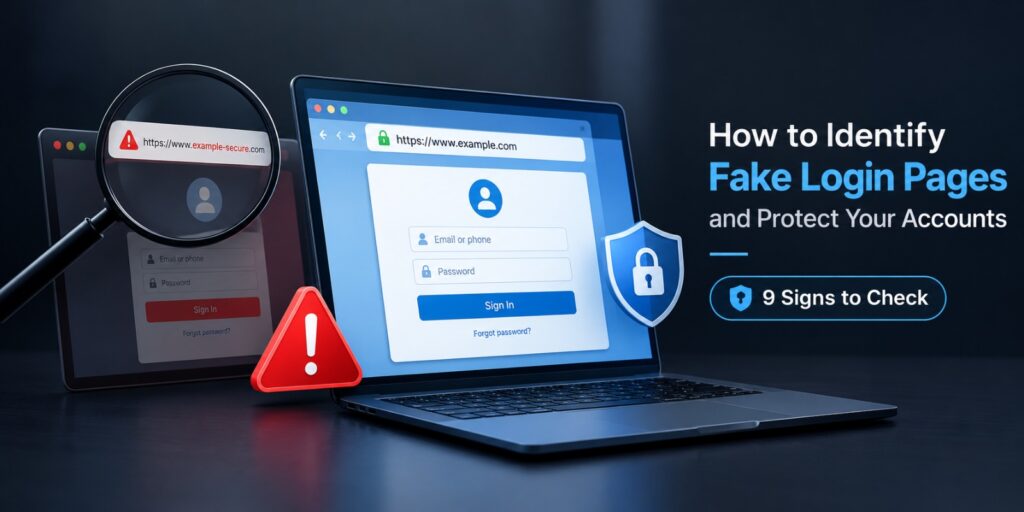
Knowing how to identify fake login pages is now a basic online skill. The Anti-Phishing Working Group recorded 971,181 phishing attacks in the first quarter of 2026. That was 13.8 percent more than the quarter before. Many of these attacks send people to a copied sign-in screen.
These pages copy the logo, colors and layout of real sites. You type your password and the attacker receives it. This guide covers the signs to check and the tools that help. It also explains what to do if you already typed your details.
Here is how to identify fake login pages. Check the web address first. Real login pages use the exact domain of the company. Fake ones add extra words, swap letters or use odd endings. Then look for spelling errors, urgent warnings and missing password manager autofill. If unsure, close the page and type the real address yourself.
Key Takeaways
- The web address is the strongest clue, so read it from left to right.
- A padlock icon only shows encryption. It does not prove the site is real.
- A password manager will not autofill on a domain it does not recognize.
- Passkeys are tied to the real website. They do not work on a fake page.
A fake login page copies a real sign-in screen to steal your password. Compare the address in the browser bar with the official site. Never sign in through a link from an email or text. Open the site yourself instead.
What Is a Fake Login Page?
A fake login page is a copied sign-in screen run by a scammer. It looks like a bank, email or social media site. Its only job is to collect your username and password.
This tactic is a form of phishing, which Wikipedia describes as a social engineering scam. The Federal Trade Commission says scammers use fake emails, texts and calls. Their goal is to get your login details. They often pressure you to act now.
The attacker sends the link by email, text message or social media message. You click, land on the copy and type your details. The real site never sees the attempt.
Why Do Fake Login Pages Work So Well?
The copy is easy to make. A scammer can save the look of a real page. Then the scammer changes where the form sends your data. To the eye, the result looks the same.
Fear does the rest. The FTC notes that scammers pressure people to act now or something bad will happen. A message about a locked account makes people click before they think.
Phones make it worse. Small screens hide the full address. Many apps open links in their own built-in browser. Kaspersky lists fake login pages on mobile as an emerging threat.
How Do Attackers Send You to Fake Login Pages?
Email is the classic route. The message claims your account has a problem or a payment failed. A button leads to the fake page.
Text messages are growing fast. The APWG Q1 2026 report cites Crane Authentication. It found voice and text phishing rose 15 percent from the last quarter of 2025. A short text with a link leaves little room to check the sender.
Social media messages and QR codes are also used. The APWG reports that social media and webmail were the most attacked sectors in 2025. Mimecast, another APWG contributor, tracked phishing sites that were advertised through QR codes.
How to Identify Fake Login Pages: 9 Warning Signs
No single sign proves a page is fake. Look for several at once. These nine checks take under a minute.
1. Check the Web Address Closely
The address bar is your best clue. Read the domain from left to right until the first single slash. The real company name must sit right before the ending, such as .com.
The IT firm The One Point compares login.microsofdealsonline.com with the real login.microsoftonline.com. The first one looks close at a glance. It is not Microsoft.
2. Look for Altered Spelling and Extra Words
Scammers swap letters, such as a number one for a lowercase l. They also add words like secure, verify or support to the domain. Quick Heal notes that fake pages often use slightly altered domain names or subdomains.
The table below shows how small the changes can be. These examples are for illustration only.
| Real address | Fake lookalike | Why it is fake |
|---|---|---|
| paypal.com | paypa1.com | A number one replaces the letter l |
| login.microsoftonline.com | login.microsoft-secure.net | The real company name ends at the wrong place |
| accounts.google.com | accounts.google.com.verify-user.net | The true domain is verify-user.net |
| instagram.com | instagram-help.com | An extra word creates a new domain |
3. Do Not Trust the Padlock Alone
A padlock means the connection is encrypted. It does not mean the site is honest. Scammers can get encryption for their own domains too.
The One Point lists a missing padlock and a plain http address as red flags. A missing padlock is a warning. A padlock that is present proves nothing on its own.
4. Watch for Spelling, Grammar and Design Flaws
The One Point says criminals use automated tools to build pages fast. That can lead to poor spelling and grammar. Blurry logos and odd spacing are other clues.
Many modern copies look perfect. Never rely on this check alone. Pair it with the address check every time.
5. Notice Urgent or Threatening Messages
The FTC says scammers pressure you to act now. Typical lines claim your account is locked or a payment failed. Some claim your password expires in one hour.
Real companies give you time. They also let you sign in the usual way. A countdown on a login page is a strong warning.
6. Check How You Arrived at the Page
The path matters as much as the page. Most people reach fake pages through a link in an email, text or direct message. If you did not start the visit yourself, treat the page as suspect.
A safe path is simple. Type the address yourself or use a saved bookmark. You can also open the official app.
7. Test Your Password Manager Autofill
Password managers match a saved login to the exact domain. On a fake domain, the manager stays quiet. G5 Cybersecurity says a missing autofill offer may signal a fake site.
Do not copy the password in by hand. That defeats the check. Close the page and go to the real site instead.
8. Look for Odd Requests on the Page
A real login page asks for a username and password. It may also ask for a code if you use two-step sign-in. It does not ask for a card number, an ID number or a phone PIN.
Extra requests mean the page wants more than a login. Close it. Report it if you can.
9. Check What Happens After You Sign In
Fake pages often show an error after you type. Some send you on to the real site. This hides the theft. You think you made a typing mistake.
If you land back on the same form after a correct password, stop. Open the real site in a new tab. Change that password from there.
Common Fake Login Pages and What to Check
Scammers copy the sites people use most. The table below lists the usual bait and the safest check for each one.
| Site type | Common bait | Safest check |
|---|---|---|
| Email and cloud accounts | Storage full or password expires | Open the official site yourself and look for alerts there |
| Social media | Copyright strike or unknown login alert | Open the app and check notifications inside it |
| Online banking | Card locked or suspicious activity | Call the number printed on your card |
| Payment apps | Failed payment or refund waiting | Sign in from the app or a typed address |
| Parcel delivery | Missed delivery or small fee | Track the parcel in the courier app |
| Work portals | Shared file or HR notice | Ask the sender on a different channel |
Kaspersky lists fake Facebook and Instagram login pages among the most common examples. These pages go after personal accounts. Work portals are targeted too. One stolen login can open many files.
How to Identify Fake Login Pages Before You Type Anything
This short routine works on any device. It also works when a page passes every visual test.
- Stop and do not click the link again.
- Read the full address in the browser bar. On a phone, tap the bar to see all of it.
- Open a new tab and type the official address yourself, or use a saved bookmark.
- Compare the two pages. If they differ, close the first one.
- Use the official app when the service has one.
- Let the password manager fill the form. No autofill means no sign in.
The routine takes about ten seconds. It becomes automatic after a few weeks. That one habit stops most link-based traps.
How to Identify Fake Login Pages on Your Phone
Phone browsers shorten the address bar. Tap it once to see the full address. Look at the part before the first single slash.
Press and hold a link to preview the real address before you open it. Do this for every link in a text or direct message. If the preview looks wrong, do not open it.
Apps can also open links in a built-in browser with no clear address bar. Choose the option to open in your main browser when it appears. Better still, skip the link and open the official app.
How to Protect Your Accounts From Fake Login Pages
Spotting a fake page matters, but a second layer matters too. A tired person can miss a sign. The tools below catch what you miss.
Use a Password Manager
A password manager only fills a login on the matching domain. That makes it a quiet alarm. It also lets you use a long, unique password for every site.
Switch to Passkeys Where Possible
A passkey is tied to the real website address. It will not work on a fake page. CISA describes phishing-resistant sign-in as the gold standard. Passkeys and security keys follow the FIDO and WebAuthn approach it names.
Know the Weak Spots of Text Message Codes
CISA warns that some two-step methods are open to phishing, push bombing and SIM swap attacks. A fake page can ask for your code. It then passes the code to the real site. Two-step sign-in still helps, but passkeys and security keys are stronger.
Keep Your Browser and Security Tools Updated
Browsers warn you about known phishing sites. These warnings work best with current software. Turn on automatic updates and keep your browser safe browsing setting switched on.
Security suites such as Kaspersky and Quick Heal include anti-phishing tools. They block known fake pages before you see them. They are an extra layer and not a replacement for the checks above.
Use a Different Password for Every Site
A stolen password should open one account only. A unique password for each site limits the damage. A password manager makes this easy.
More guides on phone and laptop safety are available on TechWorldGarage.
What to Do If You Entered Your Password on a Fake Login Page
Act fast. The sooner the real company knows, the less time an attacker has inside your account. Follow these steps in order.
- Open the real site by typing its address, then change the password at once.
- Change the same password on every other account that used it.
- Turn on two-step sign-in, or switch to a passkey.
- Sign out of all other devices and check recent activity.
- Look for email forwarding rules or new recovery details you did not add.
- Call your bank right away if you shared card details.
- Run a security scan if the page also downloaded a file.
Keep a record of the fake page address and the time you visited it. Support teams can use that detail. Do not visit the page again to copy it.
How to Report a Fake Login Page
Reporting protects other people. In the United States, the FTC accepts phishing reports at ftc.gov/complaint. Its guide on how to recognize and avoid phishing scams explains the process.
Forward fake emails to the company being copied. Many companies list an abuse or security address on their help pages. Your email app also has a report phishing option.
Outside the United States, check your national cybercrime or consumer authority. Banks also take reports by phone. Share the screenshot and the web address of the fake page.
FAQs
How can you tell if a login page is fake?
Check the web address first. Compare it with the official site. Then look for spelling errors, urgent warnings and missing autofill. If anything feels off, close the page and type the real address yourself.
Is a login page with a padlock always safe?
No. A padlock only shows that the connection is encrypted. Scammers can use encryption on their own fake sites, so always read the domain too.
What should I do if I clicked a fake login link but typed nothing?
Close the tab. Typing nothing usually means nothing was taken. Run a security scan if a file downloaded.
Can a fake login page steal my two-step codes?
Yes, some can. A fake page can ask for your code. It then passes the code to the real site. Passkeys and security keys resist this because they only work on the real domain.
What is the safest way to sign in to important accounts in 2026?
Use a passkey wherever the site offers one. CISA describes phishing-resistant sign-in as the gold standard. For other sites, use a password manager with a unique password and two-step sign-in.
How do I report a fake login page?
Report it to the company being copied and to your local consumer or cybercrime authority. In the United States, use the FTC complaint page. Include a screenshot and the web address.
Final Thoughts: How to Identify Fake Login Pages
Fake login pages work because they are quick, quiet and look right. The habit that beats them is simple. Read the address, type the real one yourself and let the password manager decide. Each step takes seconds. Teach this routine to family and coworkers too. Most people lose accounts through one rushed click. A calm pause before signing in is the cheapest protection available. For stronger sign-in methods, read the CISA fact sheet on phishing-resistant MFA.