I have rebuilt the same guide in HTML, PDF and EPUB many times. Each format broke in its own way. A PDF that looked perfect on my laptop turned into a scroll mess on mobile.
An EPUB that read well on a Kindle lost its layout in a fixed design. Picking the right format is not a small detail. It decides whether your reader finishes the page or gives up.
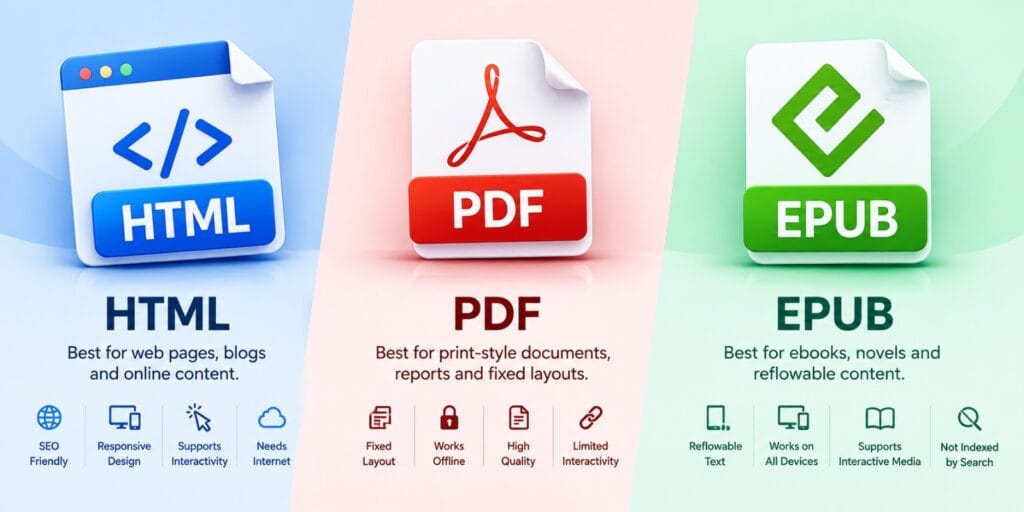
HTML works best for web pages and blog content that needs to rank in search. PDF works best for print style documents that must look the same everywhere. EPUB works best for ebooks that readers will open on phones, tablets and e-readers.
Key Takeaways
- HTML is built for the open web and search visibility, not for offline reading.
- PDF locks in exact layout but struggles on small screens.
- EPUB uses reflowable text, so it adjusts to any screen size.
- Interactive content, like quizzes or embedded video, works best in HTML and EPUB 3.
- Most publishers now combine formats instead of picking just one.
Digital publishing formats are the file types used to package content for reading. The three main options are HTML, PDF and EPUB. HTML suits web pages, PDF suits fixed layouts, and EPUB suits reflowable ebooks. Each format handles text, images and interactivity in a different way.
What Are Digital Publishing Formats
A digital publishing format is the file structure your content gets packaged in. The choice affects how text resizes, how images load, and whether the file works offline.
Publishers usually pick between three core formats. HTML powers websites and online articles, while PDF preserves an exact printed layout. EPUB adjusts to whatever screen it lands on.
According to Wikipedia’s entry on electronic publishing, the term covers ebooks and digital magazines. It has largely replaced traditional print workflows for many publishers. That shift is why choosing the right format matters as much as writing the content.
HTML vs PDF vs EPUB, A Quick Comparison
Each format trades off design control against flexibility. The table below shows the differences you will notice as a reader.
| Feature | HTML | EPUB | |
| Best for | Web pages, blogs, online articles | Printable documents, forms, reports | Ebooks, novels, long form reading |
| Layout behavior | Responsive, adapts to any screen | Fixed, same on every device | Reflowable, text resizes to fit |
| Offline access | Needs a saved copy or app | Yes, opens without internet | Yes, opens without internet |
| Interactivity | Full support with scripts and media | Limited, mostly forms and links | Supported in EPUB 3 |
| Search visibility | Strong, indexed by Google | Weak, rarely ranks well | Not indexed by search engines |
| File size | Varies, often lightweight | Can grow large with images | Usually compact |
HTML for Digital Publishing
HTML is the format search engines read best. That makes it the right choice for anything meant to rank. It is also the most flexible format for mixing text, video and interactive elements.
The tradeoff is that HTML content depends on a browser and a connection. Without a saved copy, a reader loses access once they lose signal. That makes HTML strong for blogs, but weaker for a full ebook someone carries offline.
PDF for Digital Publishing
PDF keeps a document looking exactly the way its creator designed it. That happens on any device that opens the file. That consistency is why forms, contracts and printable guides still rely on PDF.
According to Adobe’s own history of the format, PDF launched in 1993. It became an open ISO standard in 2008. That standardization is why nearly every operating system can open a PDF.
The downside shows up on small screens. A PDF built for print forces mobile readers to pinch, zoom and scroll sideways.
EPUB for Digital Publishing
EPUB was built to solve the exact problem PDF struggles with. It uses text that adjusts itself to any screen. Instead of a fixed page, EPUB stores content as structured HTML and CSS.
The World Wide Web Consortium describes EPUB as a format for packaging web content. That content includes HTML, CSS and SVG inside a single file. That web based foundation is why EPUB supports reflowable text and adjustable fonts.
EPUB is the format most e-readers and reading apps expect. If your content is a novel or manual, EPUB usually wins for comfort.
Interactive Content in Digital Publishing
Interactive content covers anything beyond plain text. Think embedded video, clickable quizzes, expandable sections or linked audio. HTML handles this natively, since it already supports scripts and media.
EPUB 3 added support for many of the same interactive features. That includes embedded video, audio and basic scripting. This made EPUB a realistic option for textbooks, not just novels.
PDF supports a narrower slice of interactivity. Mainly that means clickable links, bookmarks and fillable form fields. For richer interaction, PDF is usually the weakest of the three.
How to Choose the Right Digital Publishing Format
The right format depends on how and where your content gets read. It is not just about how it looks while you are writing it.
- Will readers need the content offline, on a phone or tablet. EPUB usually fits best.
- Does the layout need to stay pixel perfect for printing. PDF is the safer pick.
- Do you want the content to rank in search results. HTML is the only real option.
- Will the content include quizzes, video or interactive elements. HTML or EPUB 3 handle this well.
- Are you distributing through an ebook store like Kindle or Apple Books. EPUB is generally required.
Format choice also shapes how long readers stay engaged. That connects directly to our deeper breakdown of how digital publishing formats affect readership. That guide covers completion rates and reader behavior across formats.
After years of testing formats, my own rule is simple. I match the format to the reading device first, design second. A format nobody can comfortably read never gets finished anyway.
FAQs
What is the difference between HTML, PDF and EPUB?
HTML is a web page format built for browsers and search engines. PDF is a fixed layout format built for consistent printing. EPUB is a reflowable ebook format built to adjust to any screen.
Which digital publishing format is best for ebooks?
EPUB is generally the best choice for ebooks because its text adjusts to any device. Most ebook stores, including Apple Books and Kobo, expect EPUB files by default.
Can a PDF be converted to EPUB?
Yes, a PDF can be converted to EPUB using conversion software or online tools. The result works best when the original PDF has simple, text based formatting.
Is HTML good for digital publishing?
HTML works well for web based digital publishing, especially blogs and articles. It is not built for offline reading, so it suits online content best.
What file format do most e-readers support in 2026?
Most e-readers in 2026 support EPUB as their primary format. Many also accept PDF for fixed layout documents. Amazon Kindle devices remain the main exception, using their own AZW and KPF formats.
Does EPUB support interactive content?
EPUB 3 supports interactive content including embedded video, audio and basic scripting. Earlier EPUB 2 files are largely limited to text and static images.
Every format here comes down to one habit worth keeping. Pick the file type your reader’s device handles best. Worry about polish only after that.
For more on PDF’s history, see Adobe’s own History of the PDF timeline.