
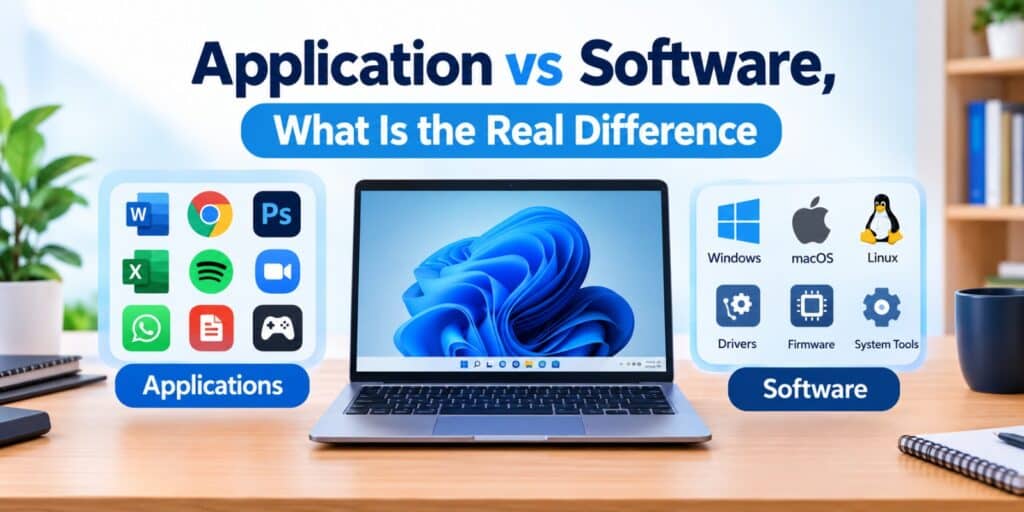
I spent years fixing computers for friends and family before I noticed something. Almost nobody understood the application vs software difference, even though they used both every single day. That confusion is the reason this guide exists.
Software is the broad term for any set of instructions that runs on a computer. An application, often shortened to app, is one specific type of software built to help a user complete a task, such as writing a document or editing a photo. Every application is software, but not every piece of software is an application.
Key Takeaways
- Software is the umbrella term, application is one category under it.
- Applications are built for end users, system software runs the computer itself.
- Examples of applications include Word, Chrome, and Photoshop.
- Examples of system software include Windows, macOS, and device drivers.
- Knowing the difference helps when installing, updating, or troubleshooting programs.
Software is any set of coded instructions that tells a computer what to do. An application is a specific piece of software designed for a direct, user facing task like writing, browsing, or editing photos. All applications count as software, but background tools like drivers and operating systems are software without being applications.
What Does Software Actually Mean
Software is the general name for all the code that makes a computer function. It includes everything from the operating system to a simple calculator app. Without software, a computer is just a box of parts with no way to do anything useful.
Software gets divided into two main groups. One group runs the machine itself, and the other group helps the person using it. This split is the starting point for understanding where an application fits in.
What Counts as an Application in the Application vs Software Debate
An application is software built for one clear purpose, used directly by a person. When you open a browser to check email, you are using an application. When you edit a spreadsheet or play a game, that is an application too.
The key trait of an application is that it faces the user. It has buttons, menus, or a screen you interact with. It does not manage the computer’s hardware in the background, it simply helps you finish a task.
Application vs Software, the Core Difference
Software is the category, application is one member of that category. Every app is software, but plenty of software never appears as an app on your screen. Drivers, firmware, and background system processes fall into this second group.
Think of software as the word vehicle and application as the word car. A car is always a vehicle, but a vehicle is not always a car. It could be a truck, a bus, or a motorcycle instead.
| Aspect | Software | Application |
| Definition | Any coded instructions for a computer | Software built for a specific user task |
| Runs where | Both foreground and background | Mostly foreground, user facing |
| Examples | Windows, drivers, firmware, apps | Word, Chrome, Spotify, WhatsApp |
| Who interacts with it | Often the system itself | The end user directly |
| Purpose | Makes the computer function overall | Completes one specific job for the user |
System Software vs Application Software
System software runs quietly and keeps the computer working. It includes the operating system, drivers, and utility tools that manage memory, storage, and hardware. You rarely open system software directly, it works behind the scenes.
Application software is the opposite. You open it on purpose to do something specific. A word processor, a photo editor, and a music player are all application software because you choose to use them for a task.
Common Examples to Make It Clearer
Seeing real examples makes this distinction click faster than any definition. Here is a simple list that separates the two categories clearly.
- System software examples, Windows, macOS, Linux, printer drivers, BIOS
- Application software examples, Microsoft Word, Google Chrome, Zoom, Spotify, Adobe Photoshop
- Utility software examples, antivirus tools, disk cleanup tools, file compression tools
Utility software sits close to system software since it supports the machine. Some experts group it separately, since it helps maintain the system rather than run it directly.
Why the Confusion Happens So Often
Most people use the words application, software, and program interchangeably in daily conversation. That habit is not wrong for casual talk, but it blurs the real application vs software distinction. According to GeeksforGeeks, an application always qualifies as software, though not all software qualifies as an application.
App stores made this worse in a helpful way. Every app store, whether on a phone or a computer, calls its products apps. This trained users to think of apps as the whole picture, when apps are really just one visible slice of it.
How This Difference Matters for Everyday Users
Knowing this difference helps when you are troubleshooting a slow computer. If an app is misbehaving, closing that single application often fixes it. If the whole system is misbehaving, the issue is likely with system software instead.
This distinction shows up in real troubleshooting cases too. When Windows Game Mode is not working, the problem usually sits at the system software level rather than inside any single game or app. Recognizing this saves time, since you know where to look first.
It also matters when you install new tools. Application software usually installs and removes cleanly through your settings. System software changes, like driver updates, carry more risk and deserve more caution before you proceed.
Microsoft’s own support documentation confirms this pattern for Windows users. Apps and programs can be removed through Settings or Control Panel, while system components are handled separately and often cannot be uninstalled at all. You can see the exact steps on the official Microsoft support page for uninstalling apps and programs.
FAQs
Is an app the same thing as a program?
An app and a program are closely related terms, and in most everyday contexts they mean the same thing. A program is any set of instructions written to perform a task, and an application is a program built specifically for end users.
An app and a program are closely related terms, and in most everyday contexts they mean the same thing. A program is any set of instructions written to perform a task, and an application is a program built specifically for end users. For a full breakdown of how the two compare, see our complete apps vs programs guide.
Is Windows considered software or an application?
Windows is software, specifically system software, not an application. It manages your computer’s hardware and provides the base that lets applications like Chrome or Word run properly.
Can software exist without being an application?
Yes, plenty of software is not an application. Device drivers, firmware, and background system processes are all software, but users never open or interact with them directly.
What is the easiest way to remember the difference?
Remember that software is the larger category and application is one type inside it. If you can open it, click around in it, and use it for a task, it is most likely an application.
In 2026, do app stores still separate applications from system software?
In 2026, most major app stores, including the Microsoft Store and Google Play, still list only applications for users to download. System software like drivers and firmware updates are handled separately through the operating system itself.
Why do some tools get called both software and applications?
Tools like antivirus programs or file compression utilities sit in a gray area. They perform a task the user notices, similar to an application, while also protecting or maintaining the system, similar to system software.
Understanding this distinction has saved me a lot of confusing support calls over the years. Once you see software as the whole tree and applications as one branch of it, every future tech conversation gets easier to follow. If you want a plain language starting point for the broader concept, the Simple Wikipedia entry on software is a good place to begin.
Pingback: Apps vs Programs: What Is the Real Difference? - Tech World Garage
Pingback: Types of Software Program Explained in Simple Terms - Tech World Garage