A blue patch on a mobile screen almost always means a red or green sub-pixel transistor has failed, leaving only the blue sub-pixel active. On OLED phones the cause is usually blue pixel degradation instead. Either way, no software fix exists, and a panel replacement is the only real cure.
I have walked several phone owners through this exact problem over email, and the first question is always the same, is this a crack I cannot see or something else entirely? It is something else entirely. This guide focuses only on phones, since a blue patch on a mobile screen behaves differently than the same defect on a laptop or monitor.
Key Takeaways
- A blue patch on a phone screen is a pixel level defect, not dirt or a software glitch.
- LCD phones and OLED phones develop this patch through two different mechanisms.
- Drops and pressure are the leading cause on phones specifically, more than on laptops or monitors.
- No app, update, or screen massage can fix a true blue patch.
- Repair cost depends heavily on whether your phone is under warranty or AppleCare style coverage.
What Does A Blue Patch On Mobile Screen Actually Mean
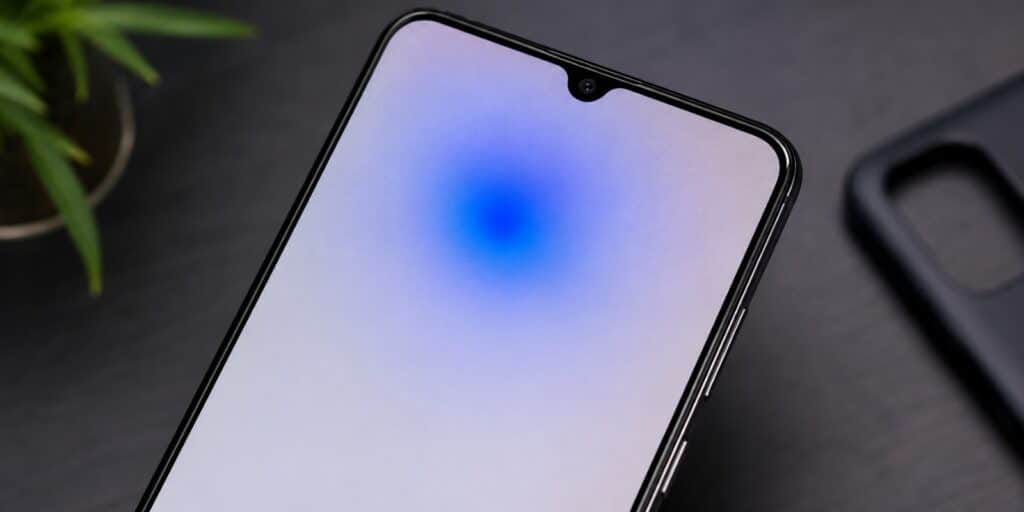
A blue patch on a mobile screen is a small area where the display shows a persistent blue tint no matter what is on screen. It looks different from a crack, a dead pixel, or a smudge. The patch stays in the same spot and shows up most clearly on white or light gray backgrounds.
This is different from a dead pixel, which looks black on every background. It is also different from a bright spot, which glows white and mainly shows up on dark backgrounds. A blue patch keeps its blue tint across most colors and only fades when the screen itself displays pure blue.
Why Do Blue Patches Form On LCD Phone Screens
Older and budget phones still use LCD panels, and here the cause is a failed transistor. Each pixel on an LCD phone has three sub-pixels, red, green, and blue, each with its own tiny transistor. When the transistor for the red or green sub-pixel fails, only the blue sub-pixel keeps working, and you see a blue patch.
Phone LCD panels are thinner and more exposed to pressure than laptop or monitor panels. That makes phones more likely to develop this failure from a direct hit or squeeze. A cracked screen protector or a drop onto a hard corner is a common trigger.
Why Do Blue Patches Form On OLED Phone Screens
Most phones sold since 2020 use OLED or AMOLED screens, and the mechanism here is different. On OLED phones each sub-pixel makes its own light, and blue organic material wears out faster than red or green material. Blue emitters need more current to reach the same brightness, so they age faster under normal daily use.
When blue pixels in one area degrade or fail, the surrounding red and green pixels can end up dominating instead. On some OLED phones this can even show up as a yellow or warm tinted patch rather than blue, depending on which channel weakens first. Physical pressure can also damage OLED sub-pixels directly and cause an immediate blue patch.
Is It An LCD Or OLED Phone, And Why That Matters
Knowing your panel type helps you understand what caused the patch and what to expect next. The table below breaks down common phones by panel type.
| Phone Type | Panel Technology | Typical Blue Patch Cause |
| iPhone X and later, except XR and 11 | OLED | Blue pixel wear, pressure damage |
| iPhone before X, iPhone XR, iPhone 11 | LCD | Transistor failure from impact |
| Samsung Galaxy S8 and later | AMOLED | Blue pixel wear, drop damage |
| Google Pixel 2 and later | OLED | Blue pixel wear, drop damage |
| Budget Android phones | LCD | Transistor failure from impact |
If you are not sure which panel your phone uses, a quick way to check is to look up your exact model name along with the word display. Apple, Samsung, and Google all publish the panel type for current models on their official specification pages.
What Causes A Blue Patch On A Phone Specifically
Phones face different everyday risks than laptops or monitors, since they get carried, dropped, and pocketed constantly. Here are the most common triggers seen on phones.
- Dropping the phone onto a hard surface, even without a visible crack
- Sitting on the phone while it is in a back pocket
- Pressure from a tight phone case pressing against the screen
- A cracked screen protector transmitting impact to the panel underneath
- Gradual pixel wear on an older OLED phone from years of daily use
- A manufacturing defect that shows up months or years after purchase
How Do I Confirm It Is A True Blue Patch On My Phone
Before assuming the worst, run a simple background test using your phone’s own display. Open your camera app, take no photo, and just use the live preview to display different solid colors from an image or a free online color test page.
Show a plain white background first, since the patch will stand out clearly against white. Then switch to a plain blue background, and a true sub-pixel blue patch will fade or blend in almost completely. If the spot stays visible and dark on every color including blue, you may be looking at a dead pixel instead of a blue patch.
Can A Blue Patch On A Mobile Screen Be Fixed With Software
No, a genuine blue patch caused by sub-pixel failure cannot be fixed through software, apps, or settings changes. Pixel fixing apps that cycle through colors only help with stuck pixels, where the sub-pixel is still working but frozen on one setting. A failed transistor or a worn out OLED emitter does not respond to that kind of rapid color cycling.
Adjusting your color filter or turning on dark mode will not remove the patch either. These settings can make the patch less noticeable during daily use, which is a real benefit even if it is not a repair. Think of it as covering a scratch rather than fixing it.
How Much Does It Cost To Fix A Blue Patch On A Phone
Repair cost depends mainly on your phone model, your warranty status, and whether you use an official or third party repair shop. For iPhones with AppleCare+, screen repair costs a flat $29 regardless of the model, while an out of warranty replacement without coverage typically runs from $129 for older models up to $379 for a current Pro Max. Third party repair shops for both iPhone and Android devices commonly charge less, though parts quality and calibration can vary.
Before paying anything, check whether your blue patch appeared without any drop or pressure. A patch that shows up on its own, especially within the first year or two of ownership, may qualify as a manufacturing defect under standard warranty. It is worth contacting the manufacturer directly before booking a paid repair.
What Can I Do While Living With A Blue Patch
If the patch is small and outside your main reading area, a few adjustments can make daily use easier while you decide on repair. These are workarounds, not fixes, but they genuinely help in the meantime.
- Turn on dark mode so the patch blends into darker interface elements.
- Choose a busy or dark wallpaper instead of a plain light one.
- Increase text and icon size so more content sits away from the patch.
- Angle the phone slightly when reading so the patch falls outside your direct focus.
FAQs
How do I fix a blue patch on a mobile screen?
A true blue patch caused by sub-pixel failure cannot be fixed at home, since it comes from damaged hardware inside the panel. Panel replacement, done by the manufacturer or a trusted repair shop, is the only real fix. Software tricks and pixel fixing apps only mask the patch or help with a different problem, stuck pixels.
How do I remove a blue patch on a mobile screen without replacing it?
You cannot fully remove a genuine blue patch without a physical panel repair, since the damage sits in the hardware. Dark mode, a darker wallpaper, and larger text can hide it during daily use. None of these steps repair the underlying sub-pixel or transistor damage.
Why does a blue patch appear on a Samsung phone screen?
Samsung Galaxy phones from the S8 onward use AMOLED panels, where blue organic pixels wear out faster than red or green ones. A blue patch on a Samsung screen can come from this normal aging process or from drop and pressure damage. Samsung’s official service centers can confirm which cause applies and quote a screen replacement.
Why does a blue patch appear on an iPhone screen?
On an iPhone with OLED, used since the iPhone X, the cause is usually blue pixel wear or physical impact damage. On an iPhone XR, 11, or any model before the X, the display is LCD, so the cause is more likely a failed transistor from a drop. AppleCare+ covers screen repair for a flat $29 fee regardless of which cause applies.
Why does my Android phone show a blue tint across the screen?
A blue tint covering a larger area, rather than one localized patch, sometimes points to a display cable or driver issue instead of a sub-pixel failure. A true blue patch stays confined to one spot and shows the strongest tint on white backgrounds. If the tint covers the whole screen, a diagnostic at a repair shop can rule out a loose display connector.
Can a blue patch on a phone screen spread or get worse over time?
Yes, a blue patch can spread, especially if the original cause was a drop or pressure rather than a manufacturing defect. Ongoing internal pressure or cracked internal layers can affect neighboring pixels over weeks. As of 2026, phone owners are advised to seek professional diagnosis quickly if a patch grows after an impact.
Conclusion
Working through these cases over time, the pattern holds steady, a blue patch on mobile screen is a hardware problem first and a nuisance second. Treat it as a signal to check your coverage rather than something to ignore. You can read more about the underlying display technology on Wikipedia’s OLED page, and see current official repair pricing directly from Apple’s support page on screen and display repair.
For background on the transistor technology behind LCD phone panels, the Wikipedia page on thin-film transistor displays is a solid reference to close on.
Read More: Why Your Screen Has a Yellow Tint Display (And How to Fix It)