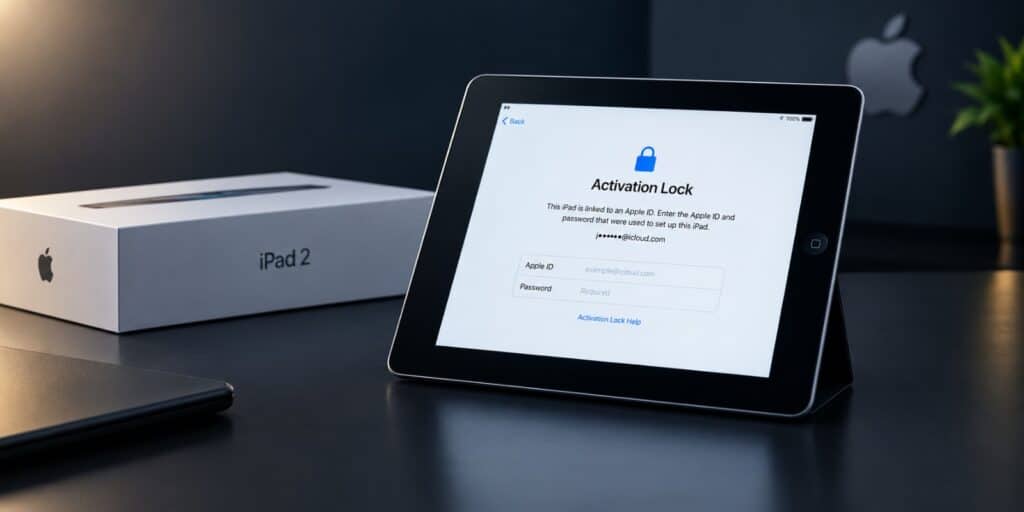
The safe fix for iPad 2 Activation Lock is the linked Apple ID. If you do not know it, ask the previous owner to remove the device online. Apple can also review a request with proof of purchase.
Key Takeaways
- Activation Lock ties an iPad 2 to the Apple ID that last set it up.
- Only that Apple ID owner can remove the lock without Apple help.
- A used iPad 2 should be unlinked before you pay for it.
- Bypass tools and paid unlock sites are not Apple methods, so treat them with care.
You turn on an old iPad 2. It asks for an Apple ID you do not know. That is iPad 2 Activation Lock, and it blocks many buyers of used tablets.
This guide shows the safe ways to unlock it. Each method is official and works through Apple. You will also see which shortcuts to avoid.
Whether you own the iPad or bought it second hand, the steps are clear. Follow them in order and you will know exactly where you stand. You can find more simple tech fixes on TechWorldGarage.
iPad 2 Activation Lock is an Apple security feature. It links the tablet to the Apple ID used to set it up. To unlock it safely, sign in with that Apple ID and password. If you bought it used, ask the seller to remove it from their account online.
What Is iPad 2 Activation Lock?
iPad 2 Activation Lock is an Apple anti-theft feature. It ties the tablet to one Apple ID. Nobody else can set it up without that login.
Apple built Activation Lock to protect lost or stolen devices. It turns on when Find My iPad is enabled. A thief cannot erase the tablet and sell it as new.
Why the iPad 2 Can Be Locked
The iPad 2 launched on March 11, 2011 in the United States. According to Wikipedia, it can run iOS 7 and later, up to iOS 9.3.5. Activation Lock arrived with iOS 7, so an updated iPad 2 supports it.
Many iPad 2 tablets still sit in drawers and sell cheaply online. Most were set up years ago with an Apple ID nobody remembers. That is why the lock shows up so often on this model.
Which iOS Versions Matter
Wi-Fi and GSM models stopped at iOS 9.3.5, released on August 25, 2016. According to Wikipedia, the Wi-Fi plus Cellular CDMA model received iOS 9.3.6 in July 2019. Both versions still show the same Activation Lock screen.
How to Tell If Your iPad 2 Is Locked
The lock shows up during setup or after a reset. The screen says the iPad is linked to an Apple ID. It then asks for that Apple ID and its password.
Part of the email address is often hidden with stars. That hint shows which account locked the tablet. It can help the real owner remember the right login.
Signs of Activation Lock on an iPad 2
- The setup screen asks for an Apple ID that is not yours.
- A masked email address appears on the lock screen.
- The iPad returns to the same screen after every reset.
- The setup process will not let you skip the sign in step.
Activation Lock Versus Passcode Lock
A passcode lock asks for a numeric code on the home screen. Activation Lock asks for an Apple ID during setup. The two problems need different fixes.
Many people mix them up. A forgotten passcode can be cleared by restoring the iPad. A restore alone does not clear iPad 2 Activation Lock.
How to Unlock iPad 2 Activation Lock If You Own the iPad
If the Apple ID is yours, unlocking takes only a few minutes. You need the correct email and password. Pick the method that matches your situation.
Method 1 Enter the Apple ID on the iPad
- Turn on the iPad 2 and reach the Activation Lock screen.
- Type the Apple ID email you used to set up the iPad.
- Enter the password for that Apple ID.
- Tap Next and wait for setup to finish.
This works when you remember both details. Type them slowly, because one wrong letter returns an error. Check that the keyboard is not stuck on capital letters.
Method 2 Recover a Forgotten Apple ID or Password
Apple runs an account recovery page at iforgot.apple.com. Use it to reset the password or find your Apple ID. You will need access to the recovery email or phone number.
Search your old inboxes for messages from Apple. Receipts and security alerts often show the right Apple ID. Once you reset the password, enter it on the iPad 2.
Method 3 Remove the iPad From iCloud Online
- Open a browser on another device and go to iCloud.com.
- Sign in with the Apple ID linked to the iPad 2.
- Open Find My and choose All Devices.
- Select the iPad 2 from the list.
- Choose Erase iPad, then pick Remove from Account.
This method is useful when the iPad is in another room or another city. It also works when you want to sell the tablet. Once the device is removed, the next person can use their own Apple ID.
Method 4 Turn Off Find My iPad Before a Reset
On iOS 9, open Settings and tap iCloud. Scroll down to Find My iPad and switch it off. Enter your Apple ID password when asked.
Do this before you erase or sell the tablet. With Find My iPad off, the lock will not return after the reset. Skipping this step is the most common cause of a locked resale.
What to Do If You Bought a Used iPad 2 With Activation Lock
According to Apple Support, buyers should confirm a used device is erased before taking ownership. It must also be unlinked from the previous owner. Apple tells buyers to ask the seller to remove it using a browser.
This is the cleanest fix. The seller only needs to sign in to iCloud.com and remove the device. It takes the seller a few minutes.
Contact the Seller First
Send a short, polite message with the item listing details. Ask the seller to remove the iPad 2 from their Apple account. Explain that the tablet shows the lock screen.
Some sellers forget this step and fix it quickly once reminded. Keep the conversation inside the marketplace app. That keeps a record in case you need to open a dispute.
Check the Lock Screen for an Owner Message
Some owners leave a contact message on the lock screen. Read the screen carefully before you assume there is none. A message may give a phone number or email address.
Use it only to reach the owner and ask for removal. Do not guess passwords or try to open the account yourself.
Ask for a Refund If the Seller Does Not Reply
If the seller goes silent, use the return policy of the store or marketplace. Apple Support Community members suggest a refund when the owner cannot be found. The rules depend on where you bought it.
Act quickly, because return windows are short. Keep screenshots of the lock screen and your messages. They show the problem existed when you received the tablet.
Can Apple Remove iPad 2 Activation Lock for You?
Apple has a support request process for Activation Lock. According to Apple, proof of ownership documentation is required. Apple sets the rules for approval, so keep your expectations realistic.
What Proof of Purchase Can Include
Apple Support Community contributors say a receipt showing the serial number is the usual proof. The receipt should match the device you hold. A box label alone may not be enough.
Many iPad 2 owners no longer have the original receipt. That makes this route hard for tablets bought around 2011. It works best when you kept your paperwork.
Where to Start the Request
Apple links the request page from its article on removing Activation Lock. You fill in the device details and upload your documents. Then you wait for Apple to respond.
Have the serial number ready before you begin. You can find it on the back of the iPad 2. Take a clear photo of your receipt as well.
Why Bypass Tools and Unlock Services Are a Poor Idea
Search results for iPad 2 Activation Lock are full of unlock offers. Some ask for payment before showing any proof. Apple does not list any of them as official methods.
Experienced Apple Support Community members repeat the same advice. They say only the account owner or Apple can remove the lock. That matches what Apple says about its own security feature.
Risks You Take With Unlock Services
- You can lose money on a service that does not work.
- You may hand over personal details to a stranger.
- Unknown software can put your computer at risk.
- A removed lock may not stay removed after an update.
If the iPad Might Be Stolen
Sometimes a buyer realizes the tablet came from a bad source. Activation Lock exists to stop exactly this kind of resale. The right move is to return the device and ask for your money back.
Common Mistakes With iPad 2 Activation Lock
These mistakes cost people time and money. Most are easy to avoid once you know them.
- Buying a used iPad 2 without checking the lock screen first.
- Resetting the iPad before turning off Find My iPad.
- Trusting a seller who says the lock is gone but cannot show it.
- Paying a stranger for an unlock code.
- Confusing a forgotten passcode with Activation Lock.
- Throwing away the receipt and the original box.
The first mistake is the biggest one. Ask the seller to power on the iPad 2 on a video call. A tablet that reaches the Hello screen is safe to buy.
iPad 2 Activation Lock Options Compared
The right route depends on who you are and what you hold. Use this table to find your situation quickly.
| Situation | Best Route | What You Need | Effort |
|---|---|---|---|
| You own it and know the Apple ID | Sign in on the iPad | Apple ID and password | Low |
| You own it and forgot the password | Recover the account | Recovery email or phone | Medium |
| You can reach the previous owner | Ask them to remove it online | Their iCloud login | Low |
| Bought used, seller cannot be reached | Refund or Apple support request | Proof of purchase | High |
| No owner and no proof | No safe unlock route | Nothing available | Not possible |
The last row feels harsh, but it is honest. Apple Support Community experts say the tablet stays locked without the owner. In that case a refund or recycling is the practical choice.
Is an Unlocked iPad 2 Still Worth Using?
An unlocked iPad 2 still works for simple jobs. Apple discontinued the model on March 18, 2014, according to Wikipedia. It cannot run iOS 10 or any later version.
Apple Support Community contributors note that compatible apps are getting harder to find. Many developers have dropped support for old iOS versions. Check your must-have apps before you spend time on the unlock.
Good Uses for an Old iPad 2
- Reading ebooks and saved web pages.
- Playing music or podcasts in the kitchen.
- Showing photos as a digital frame.
- Basic video calls on older apps that still run.
A Quick Tip Before You Spend Money
Decide what you need the tablet to do. If you want modern apps, a newer iPad is a better buy. If you only need a reader, the iPad 2 can still do the job.
Final Thoughts: Can You Unlock an iPad 2 Without the Owner?
Not safely. iPad 2 Activation Lock needs the linked Apple ID or an approved request from Apple. Every honest fix starts with the owner or with proof that you are the owner.
The best habit is simple. Check the lock screen before you buy. Turn off Find My iPad before you sell. For more clear, practical fixes, browse the latest guides on TechWorldGarage.
Wikipedia has the full model history of the iPad 2 for anyone curious. Apple explains the exact removal steps on its page about how to remove Activation Lock. Apple also publishes an overview on its official Activation Lock page.
Frequently Asked Questions
Can I unlock iPad 2 Activation Lock without the Apple ID?
Not through any official method that works alone. The linked Apple ID is needed, or the previous owner must remove the device online. Apple may also review a request with proof of purchase.
How do I remove iPad 2 Activation Lock if I forgot my password?
Start with the Apple account recovery page at iforgot.apple.com. In 2026, that page is still the usual place to reset an Apple ID password. After the reset, sign in on the iPad 2 with the new password.
Does a factory reset remove Activation Lock on an iPad 2?
No. A reset erases your data, but the Activation Lock screen returns during setup. Only the linked Apple ID or an Apple approved removal clears it.
Can the previous owner remove Activation Lock remotely?
Yes. The owner can sign in to iCloud.com and open Find My. Then they select the iPad 2 and remove it from the account. This is the method Apple points buyers toward.
What proof does Apple ask for to remove Activation Lock?
Apple states that proof of ownership documentation is required. A receipt that shows the iPad 2 serial number is the usual example. Keep your paperwork in a safe place.
What is the last iOS version for the iPad 2?
According to Wikipedia, the last version is iOS 9.3.5 for Wi-Fi and GSM models. The CDMA model received iOS 9.3.6 in July 2019. The iPad 2 cannot run iOS 10.