I switch between a browser tab, a desktop program, and a phone app for the same task more often than I would like to admit. Editing a document, checking email, and tracking my budget all happen on a different type of app depending on where I am. That habit is exactly why the Web App vs Desktop App vs Mobile App question matters more than most people realize. Picking the right one saves storage space, saves time, and saves you from switching tools later. The comparison sits alongside our broader types of software program guide, which covers the four main software categories in full
Quick Answer: A web app runs inside your browser and needs no installation, a desktop app installs directly on your computer for full offline power, and a mobile app installs on your phone for quick access on the move. Choose a web app for convenience, a desktop app for heavy or offline work, and a mobile app for tasks you need to do right now, wherever you are.
Key Takeaways
- A web app works inside any browser and updates itself automatically, with no download needed.
- A desktop app installs on your computer and generally offers the strongest performance and offline access.
- A mobile app installs on your phone and is built for short, quick tasks on the move.
- Storage space, internet dependence, and how often you use a tool are the biggest factors in choosing between them.
- Many services now offer all three, so the real decision often comes down to which one fits your daily habits.
What Is a Web App
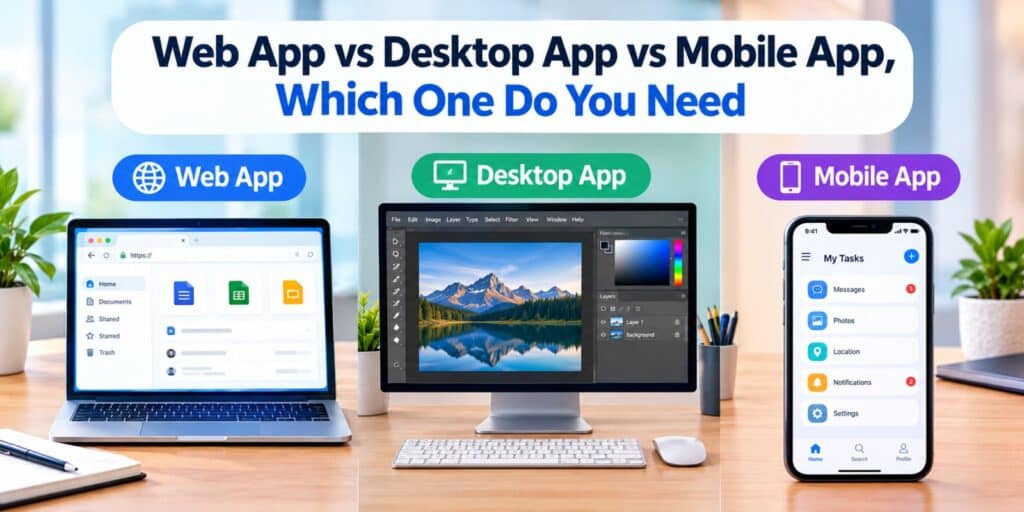
A web app is software that runs inside a browser like Chrome, Edge, or Safari. You open a link, and the app loads without any installation. Gmail, Google Docs, and Canva are common examples people use every day.
Web apps update themselves in the background, so you always see the newest version. They also work across almost any device with a browser and an internet connection. The tradeoff is that most web apps need that internet connection to function properly.
What Is a Desktop App
A desktop app is software installed directly on your computer, whether that is Windows, macOS, or Linux. Programs like Microsoft Word, Adobe Photoshop, and most video editors fall into this category. Once installed, a desktop app usually runs faster and handles heavier tasks better than its browser based version.
Desktop apps also work fully offline in most cases. The downside is that they take up storage space, and updates often need to be downloaded manually. If you have ever compared apps vs programs on your own computer, a traditional desktop app is closer to what people usually mean by a program.
What Is a Mobile App
A mobile app installs on a smartphone or tablet through an app store like Google Play or the Apple App Store. Instagram, WhatsApp, and mobile banking apps are everyday examples. Mobile apps are built around short sessions and quick actions rather than long, complex work.
Mobile apps can access phone specific features that a web app cannot reach as easily. This includes the camera, GPS location, and push notifications. They are the most convenient option when you are away from a computer.
Web App vs Desktop App vs Mobile App: Key Differences
The table below lines up the three side by side across the factors that matter most for everyday use.
| Feature | Web App | Desktop App | Mobile App |
| Installation | None, runs in browser | Required, downloaded once | Required, from an app store |
| Internet needed | Usually yes | Usually no, after install | Depends on the app |
| Performance | Good for light tasks | Strongest for heavy tasks | Fast for short tasks |
| Updates | Automatic | Often manual | Usually automatic |
| Storage used | Very little on your device | More, depending on the program | Small to moderate |
| Best for | Quick access from any device | Long, complex, or offline work | Tasks on the move |
Which One Do You Need for Everyday Tasks
The right choice usually depends on what you are trying to do and where you are doing it. A student writing an essay across a school computer and a home laptop benefits most from a web app, since the work follows them automatically. Someone editing video for hours at a time is better served by a desktop app built for that kind of load.
A person checking messages, ordering food, or scanning a document while out benefits from a mobile app instead. The task itself, more than personal preference, usually points to the right type of app. If you are unsure which category a specific tool falls into, our guide on system software vs application software explains the broader software categories these apps sit inside.
Speed, Storage, and Offline Access Compared
Desktop apps generally win on raw speed, since they use your computer’s full processing power directly. A web app depends partly on your internet connection and browser performance instead. Mobile apps sit in between, optimized for quick loading rather than heavy processing.
Storage works in the opposite direction. Web apps use almost no local storage since everything lives on a server. Desktop apps use the most storage, often several hundred megabytes or more per program, while mobile apps usually fall somewhere in the middle.
Security Differences Between the Three
Security depends more on the specific app than the category it belongs to, but some general patterns hold. Desktop apps installed from outside official sources carry more risk, which is why checking how to tell if a software is safe to install matters before downloading anything new. Mobile apps go through app store review, which filters out a large share of obviously harmful software before it ever reaches your phone.
Web apps put more responsibility on the website itself to protect your data. Using strong, unique passwords and enabling two factor authentication helps regardless of which type of app you choose. No single category is automatically safer in every situation.
How to Decide Which One Fits You
Work through these questions before choosing a type of app for a new task.
- Will you need this tool on more than one device, including ones that are not yours?
- Does the task require heavy processing, like video editing or 3D design?
- Do you need it to work without an internet connection?
- Will you mostly use it in short bursts while away from a computer?
- Does the tool need access to your camera, location, or notifications?
Answering yes to the first question usually points toward a web app. Answering yes to the second or third points toward a desktop app. Answering yes to the fourth or fifth points toward a mobile app.
FAQs About Web Apps, Desktop Apps, and Mobile Apps
Is a web app the same thing as a website?
Not exactly, since a website mainly displays information while a web app lets you perform tasks like editing or managing data. Gmail and Google Docs are web apps rather than plain websites. The line between the two has become blurry, but interactivity is the key difference.
Do mobile apps work without an internet connection?
Some do, especially ones built for note taking, offline maps, or media playback. Most mobile apps still need at least an occasional connection to sync data or update content. Check the app description or settings to confirm offline support before relying on it.
Which is more secure, a web app or a desktop app?
Neither is automatically more secure, since it depends on how the specific app handles your data. Web apps rely on the website’s own security practices, while desktop apps rely on how carefully you install and update them. Using official sources and strong passwords matters more than the category itself.
Can one service offer a web app, a desktop app, and a mobile app at the same time?
Yes, and many popular services already do this in 2026, including tools like Slack and Spotify. This lets you switch between devices while keeping the same account and data. The core features are usually similar, though desktop versions often include a few extra tools.
Why do desktop apps use more storage than web apps?
A desktop app stores its full program files directly on your computer, including everything it needs to run offline. A web app keeps most of that on a remote server and only loads what you need at that moment. This is also why desktop apps can work without internet access.
Should a small business build a mobile app or a web app first?
Most small businesses see faster results starting with a web app, since it reaches every device without an app store approval process. A mobile app makes more sense once customers need quick, repeat access with phone specific features. Many businesses eventually offer both once the web app proves useful.
Final Thoughts
None of these three app types is better in every situation, and that is really the point. In my own routine, the browser tab handles quick tasks, the desktop program handles the heavy work, and the phone app handles everything in between. Once you match the app type to the actual task, the whole Web App vs Desktop App vs Mobile App debate stops feeling complicated.
If you want a deeper technical breakdown of how browser based software works under the hood, Wikipedia’s page on the web application is a solid next stop.