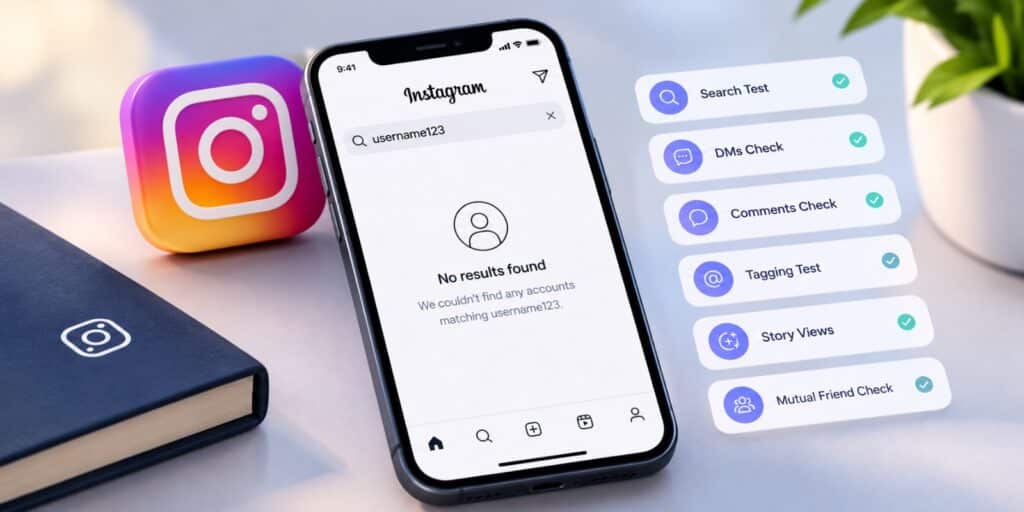
You are most likely blocked if their exact username returns no results in your search. The same profile will still load for a friend or in a logged-out browser. Your old chat also freezes and tagging fails. One sign alone proves nothing, so confirm at least three.
Key Takeaways
- The search test and a mutual friend check give the strongest proof.
- Instagram never sends any alert when someone blocks you.
- Deactivated, deleted, and private accounts can look like a block.
- A block is very likely when three or more signs match.
Instagram never tells you when someone blocks you. There is no alert and no email. The person just vanishes from your app. That silence makes people guess. A missing profile can mean a block, a deleted account, or a plain app glitch. Treating one odd sign as proof leads to wrong conclusions fast.
This guide shows how to know if you’re blocked on Instagram using seven clear signs. You also get a comparison table and a list of common false alarms. Each check takes only a minute or two.
To know if you’re blocked on Instagram, search their exact username first. Zero results is a strong clue. Then ask a mutual friend to open the same profile. Check your old chat for frozen messages, and try tagging them in a story. If several checks fail together, a block is very likely.
How to Know If You’re Blocked on Instagram in 7 Signs
You can confirm a block by comparing seven signs. Some signs are strong proof, while others only support the case. The list starts with the most reliable checks.
- Their profile does not appear in your search.
- A mutual friend can see the profile but you cannot.
- Your old chat is frozen and the profile picture turns grey.
- You cannot tag or mention their username.
- Their comments are missing from mutual posts.
- Their stories stop showing up for you.
- Their profile link opens an empty page.
Each sign is explained below. Treat any single sign as a hint only. A block becomes likely when three or more signs match.
What Happens on Instagram When Someone Blocks You
A block cuts several links at once. You cannot find their profile in search. You also lose access to their posts, stories, and reels. Knowing this makes how to know if you’re blocked on Instagram much easier.
The block removes follow links in both directions. You disappear from their followers list. They disappear from your following list too.
Your messages stop reaching them after the block. Your old chat stays on your side, but the conversation no longer works. This is why a frozen chat is such a useful clue.
Instagram sends no notice to you because blocking is meant to stay private. That design means you must rely on signs instead of a message. It also means the signs can be confusing.
A person can also choose to block new accounts you create. This option sits inside the block settings. It explains why a fresh account may not solve anything.
The Strongest Signs You Are Blocked on Instagram
These first three checks answer how to know if you’re blocked on Instagram most reliably. Start here before you look at anything else. Two matches from this group are already a strong case.
Sign 1. Search for Their Exact Username
Open the search tab and type their full username. Enter it exactly as you remember it, with the same dots and underscores. A blocked account will not show up in the results.
Search can fail for other reasons. Log out, or open Instagram in a private browser window. If the profile loads there, the account exists and the block is likely aimed at you.
If the profile is missing everywhere, the account was probably deactivated or deleted. That points away from a block. Run the search twice, a few hours apart, to avoid a false result.
Sign 2. Ask a Mutual Friend to Look
This is the most reliable manual check after the search test. Ask a friend who knows both of you to open the profile. Ask them to describe what they see.
If they see posts, followers, and a bio while you see nothing, the block is close to confirmed. If they also see nothing, the account is gone for everyone. That points to deactivation or deletion.
Keep the request casual. You do not need to explain why you are asking. A quick screenshot from their phone works as clear proof.
Sign 3. Check Your Old Chat Thread
A blocked chat does not vanish. It stays in your inbox exactly where it was. Your old messages remain visible, but the conversation stops working.
New messages may fail to send or sit there unsent. You will not see any read receipt on new messages. The profile picture beside the chat often turns into a plain grey circle.
A deactivated account freezes the chat too. The difference is that it freezes for everyone, not only you. Use the mutual friend test to tell the two apart.
Supporting Signs of a Block on Instagram
The next four signs are weaker on their own. They still add weight when they match the strong signs. Use them to build a clearer picture, not to reach a final answer.
Sign 4. Try Tagging or Mentioning Them
Start a new story and type an at sign followed by their username. Autocomplete normally suggests accounts you follow or message often. A blocked account stops appearing in those suggestions.
Type the full username as well. If Instagram still finds nothing, that supports a block. A private account usually still appears in the tag list, so this check helps separate the two.
Sign 5. Check Comments on Mutual Posts
Open a recent post from a friend you both follow. Look for comments from the person you suspect blocked you. If their comments used to show and now do not, take note.
Comments can also hide because of slow loading or moderation filters. Treat this as a secondary clue. It never proves a block alone.
Sign 6. Notice Missing Stories
Think about how often you used to see their stories. If they stopped completely, even during their usual active hours, that is worth noting. On its own, it means very little.
People post less, move to a Close Friends list, or take a break. Use this sign only to support the stronger checks above. Never act on it alone.
Sign 7. Open Their Profile Link
If you have an old link to their profile, open it in the app. A blocked profile often loads as an empty page. You may see zero posts or a message that the user was not found.
Compare this with a private account. A private profile shows a lock icon and a message saying the account is private. A blocked profile gives you no such message and no access.
Your follow status also changes. You no longer appear in their followers list. Instagram removes that link the moment the block happens.
Blocked vs Deactivated, Private, and Restricted Accounts
Many situations look like a block at first glance. The table below compares them side by side. It shows where each situation differs from a real block, which is the core of how to know if you’re blocked on Instagram.
| Situation | Profile search | Old chat | Tagging | What a mutual friend sees |
|---|---|---|---|---|
| Blocked | No result | Frozen, new messages fail | Fails | Profile loads normally |
| Deactivated or deleted | No result | Frozen | Fails | Nothing, same as you |
| Private account | Profile appears with a lock | Works if already connected | Works | Posts, only if they follow |
| Restricted | Profile appears | Chat moves to message requests | Works | Profile loads normally |
| App glitch | Missing for a short time | Normal | Fails until refresh | Profile loads normally |
Only a block hides the profile from you while it stays visible to friends. The glitch row looks similar at first. A refresh or an app restart usually clears it.
Common Mistakes When Checking If You’re Blocked on Instagram
People jump to conclusions fast, and that is understandable. Getting blocked stings. Most false alarms come from five situations that look close to a block.
- Deactivated accounts hide the profile from everyone, so always compare with a friend.
- Deleted accounts also vanish for everyone, and the username may go to someone new later.
- Private accounts show a lock icon and a private message, which is not a block.
- Restricted accounts send your messages to a separate folder while the person stays visible.
- App glitches and slow search updates can hide a profile for a few hours.
Timing matters too. Search results can lag behind account changes. A second check on another day gives a cleaner answer than a single quick look.
Restricted and Muted Accounts Are Not Blocks
Restrict is a softer tool than a block. The person can still see your profile, and you can still see theirs. Your comments on their posts are hidden from other people, and your messages go to a separate folder.
Mute works even more quietly. The person stops seeing your posts or stories in their feed, but nothing changes for you. You will notice no sign at all, so mute is nearly impossible to detect.
What to Do After You Confirm a Block on Instagram
First, accept that the choice belongs to them. People block for many reasons, and most have little to do with you. Avoid asking friends to pass on messages.
Do not create a new account to contact them. It can come across as harassment. It can also make the situation worse.
Instagram handles blocks through its privacy tools. According to Wikipedia, Instagram launched in October 2010 and Meta owns it today. The Instagram Help Center lists the official steps for blocking and unblocking accounts.
If you think the block was a mistake, reach out once through another channel, such as a text or an email. Keep it short and polite. Then give the person space to reply or not.
Frequently Asked Questions
Does Instagram notify you when someone blocks you?
No. Instagram sends no alert, email, or message when someone blocks you. You can only find out by checking the signs yourself.
What does a blocked Instagram account look like?
Their profile will not appear in your search, and their old posts will not load. Your old chat stays visible but stops working. The profile picture in that chat often turns grey.
How can I check if someone blocked me on Instagram in 2026?
Search their exact username, then repeat the search from a logged-out browser or a friend’s account. If the profile shows up there but not on yours, you are likely blocked. Add the chat and tagging checks for extra proof.
Can I still see old messages from someone who blocked me?
Yes, in most cases the old chat stays in your inbox. You can read the earlier messages, but you cannot send new ones. The person will not receive anything you try to send.
What is the difference between blocked and restricted on Instagram?
A block hides the profile from you and cuts all contact. A restriction keeps the profile visible, but your messages go to a separate folder and your comments are hidden from others.
Final Thoughts on How to Know If You’re Blocked on Instagram
Most people who ask this question have already spotted one strange sign. A missing profile or a frozen chat feels personal fast. The better move is to slow down and run the full set of checks.
Start with the search test and the mutual friend check. Add the chat, tagging, and profile link checks for backup. Three matching signs make a block very likely.
Anything less deserves patience. Accounts get deactivated, set to private, or hit by glitches all the time. For more simple app guides, read more on TechWorldGarage.
You can review how blocking and privacy controls work on Instagram’s official website. Use that as your reference point when the signs feel unclear.