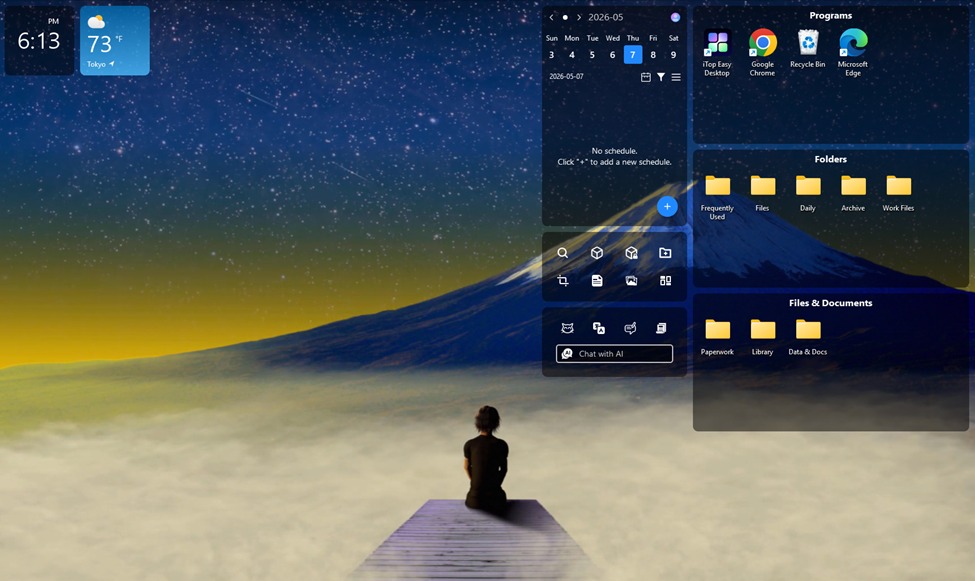
My desktop wasn’t just messy. It was doing my head in properly. Open the laptop at quarter past eight, see the wall of icons, chest goes tight before I’ve even checked email. Three versions of the same brief of a client invoice from the last three months that I kept meaning to file. Every stray file felt like a tiny unread text I was failing to reply to. To be frank, I never really faced any issues with being disorganized or getting overwhelmed by the situation; however, there were times when I used to get overwhelmed.
About the iTop Easy Desktop Organization Software
iTop Easy Desktop is a software that sorts things. It is like the psychiatry I needed but didn’t receive for the last few months. It was created by iTop and comes with many features, including file organization, Pomodoro timer, weather forecast, sticky notes, an AI assistant, and really a silly pet on the computer screen. This software takes two minutes to install. I almost skipped the installation since the description was boring.
Features That Cleared My Head
Time after time, I have been tempted to call this a clean up tool. In reality, it is not. The truth is:
One-Click Auto-Organisation
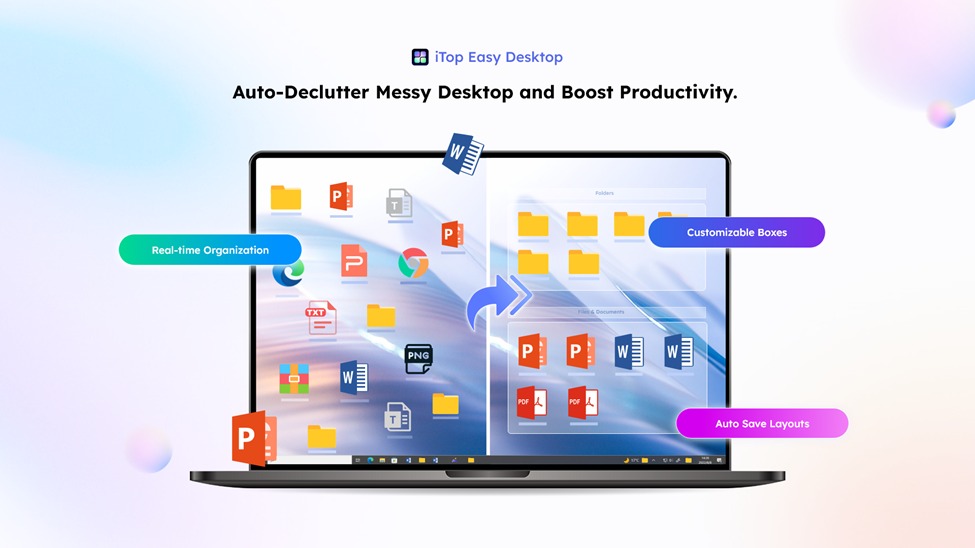
It only took one click for all the disarrayed icons to be lined up in neat little boxes: Documents, Images, Programs, Folders—four seconds. It was then that I realized I was just sitting there stupidly. What I didn’t realize is how relieved I actually felt: dropping my shoulders, that wall in front of me no longer an obstacle.
Quick Search and Folder Portal
File names have always been problematic for me. The search feature in Windows did not offer much help either, meaning that I had to do a quick search just before every client call. Actually, the search works quite well – I need to type only three letters in order to find the file, and my work is done. The Folder Portal helps me access the File Explorer from my desktop and navigate through folders. Thus, my nervousness before calls has considerably decreased.
iPomodoro and Widgets
My underestimation of iPomodoro has been constant throughout. By working for 25 minutes and taking five minutes off in between to not scroll through Slack, my emails, and Twitter, I am able to complete more work in two intervals than I was able to do in an entire afternoon pretending that I was productive before.
Private Box and Peace of Mind
When it comes to contract clients, The Private Box uses passwords to protect their files. This feature was put to test once my supervisor suddenly needed me in the middle of screen sharing. Its performance cannot be faulted. The other function of the desktop organizer software I use quite often is auto-hide; it makes the entire desktop blank through a double-click, which can be handy if a person happens to walk in on you while working on something important.
PawPal and the Wallpaper
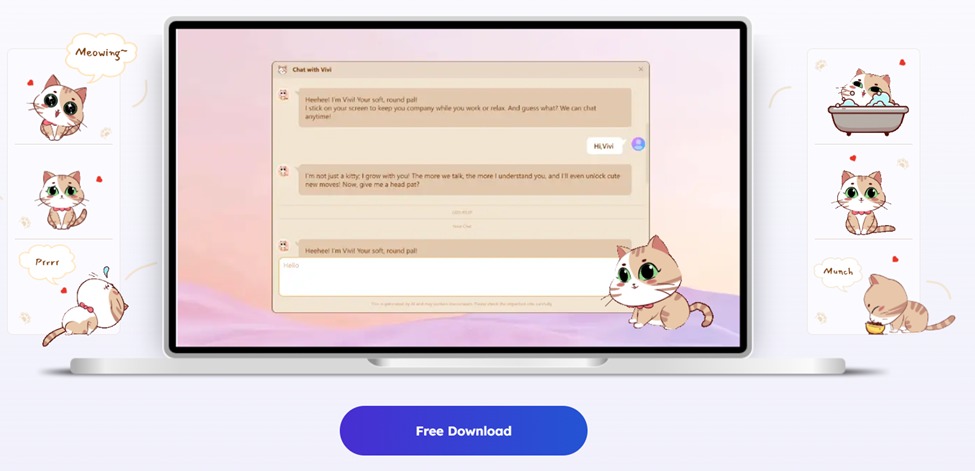
While at first I considered PawPal, the desktop pet (a little cat), quite silly, after two weeks I find myself clicking on it every time I finish a paragraph. It waves its hand, which is pretty cute. This is definitely something I am not proud of admitting. While I was expecting to dislike the live wallpaper, theme packs, and translation assistant, I use them all the time now.
Layout Backup and Red-Dot Reminders
Auto-save takes a picture of my setup every day. Windows updates mix my website’s icons in the morning (this has happened twice), but with the click of a button, everything is back in its original shape. There is also a red dot that indicates the availability of files that have not been organized by me. I have found some random screenshots that I would otherwise have lost.
How Did I Reset My Desktop in Five Steps?
Step 1: Install in Two Minutes
Grabbed the installer from the official site and ran it. At most, two minutes and all done. Setup wizard consists of a few steps, it is not a way to sell anything else to you. I was organizing my desktop within five minutes. Now, I have to say that it was surprisingly easy.
Step 2: One Click to Auto-Organize
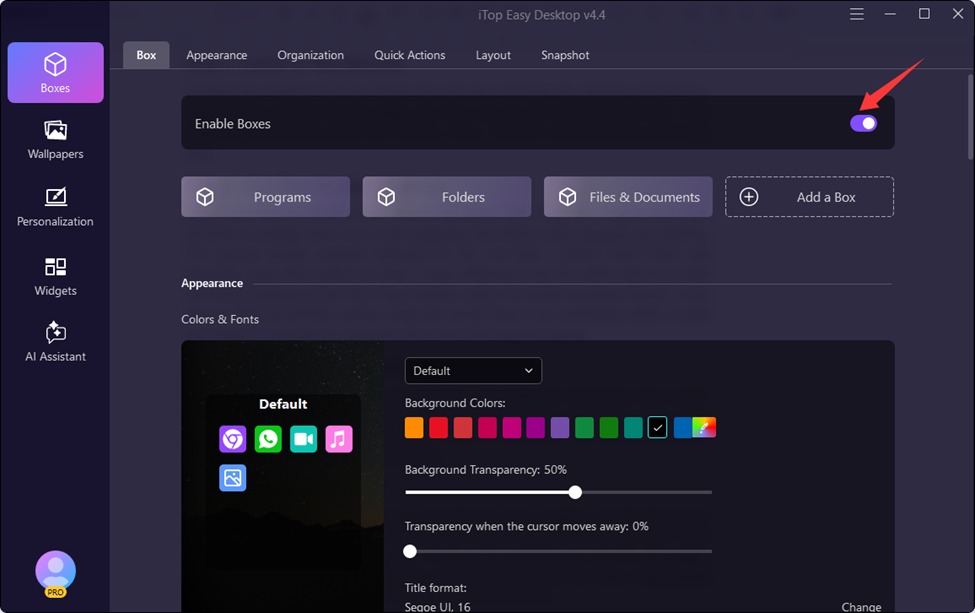
When launching for the first time, choose the option to enable boxes. It takes only a few seconds to arrange each icon in the respective box without even having to do anything. The pre-set groups seemed sufficient for me, but then I added Client Work and Personal, since they suited my style. It was amazing to see the entire mess sort itself out in the presence of the iTop Easy Desktop, when my doubts vanished forever. It was obvious that yet another useless utility that would have to be uninstalled within a week had made its way into my computer. But I have been proved wrong.
Step 3: Set Up Your Mental Zones
I pulled the boxes, changed the size of some, and made the Urgent box red so that I wouldn’t be able to miss it. Smarter Roll adjusts the boxes against the edge of the screen whenever you are short for space, which is convenient. I’ve renamed the boxes and numbered them by level of importance.
Step 4: Add the Calm Stuff
The wallpaper of nature that I chose is peaceful; the clock, weather, and the iPomodoro timer are on, and I also started PawPal. He is now sitting in the corner, and I have stopped acting like I do not like him. What really surprised me was the iPomodoro technique, where you spend twenty-five minutes working and then take a five minute break, making sure that the whole day does not just slip away.
Step 5: Lock the Sensitive Stuff
Created a private box, set password, and uploaded two client agreements, as well as several older tax documents in PDF format which I was planning to deal with for the last two months. The auto-save works on a daily schedule. In two weeks, the backup has become useful twice. There were two occasions where this happened, once after doing an update on Windows overnight that messed up everything, and once due to my carelessness while dragging. It only took one click to fix it both times.
Who Should Use It?
Anyone whose desktop has become a daily stress. This is for freelancers, students, people who work remotely, and people who plan to get organized but never go through with it. If your screen makes you sigh, try this out.
Final Thought
I came in expecting an organized display, and that’s exactly what I got. What I didn’t expect is the added bonus that came with it. The desktop is organized. The mind is organized too. After sitting down, I don’t have that little surge of fear that I had gotten used to experiencing for months now. The small utility of a desktop welcomes me, iPomodoro timer keeps me disciplined, and the organization abilities keep me sane. If your files are in disarray and your mind seems to be in the same state, you should try out iTop Easy Desktop.