I have followed AI coding tools for a while, and their progress still surprises me. First they fixed small bugs. Now one developer says they helped him rebuild seven Adobe style apps.
Software Is Over AI is a claim from developer Brandon Thomas. He used AI to build seven free, open-source apps that copy Adobe tools. The project is called ArtCraft. Thomas says Claude Opus 5.5 helped write the Rust code. The apps are free, but they are still early and cannot replace Adobe yet.
Nothing here replaces Adobe today, because the apps are young and still rough. Even so, the project shows how fast AI can speed up large software builds. It also gives users a possible exit from pricey creative subscriptions.
Quick Answer
Yes, the ArtCraft apps are free to download and use. They are open source under MIT or Apache licenses. They are early builds, so expect bugs and missing features.
Key Takeaways
- Brandon Thomas released seven free ArtCraft apps that recreate Adobe tools.
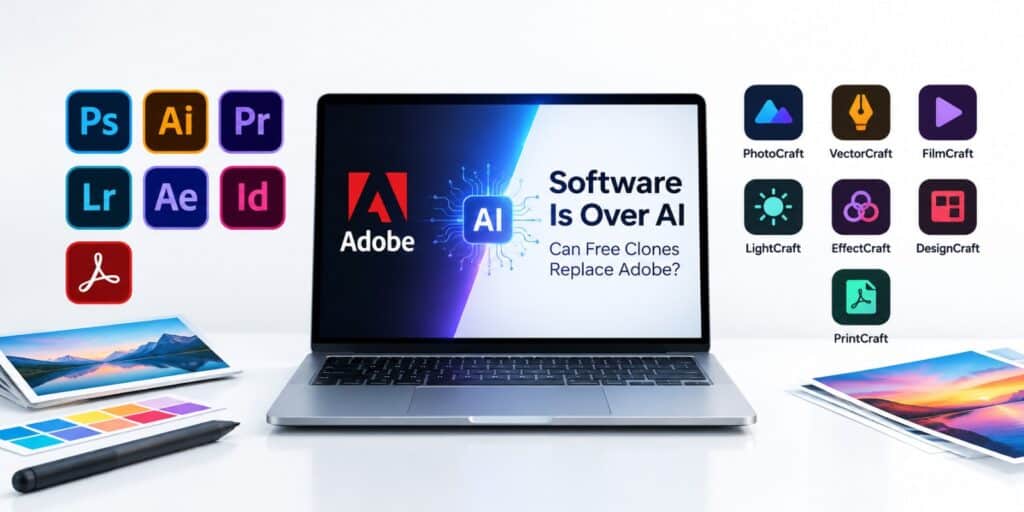
- The apps target Photoshop, Illustrator, Premiere, Lightroom, After Effects, InDesign and Acrobat Pro.
- Thomas says Claude Opus 5.5 helped write the Rust code.
- Early users report bugs, and Thomas has softened his parity timeline.
- Legal questions about trade dress and patents are still open.
What Does Software Is Over AI Mean?
Software Is Over AI started as a bold statement from Brandon Thomas. He made it while announcing a set of free apps built to recreate Adobe tools. The phrase then spread across many tech news sites.
According to TechSpot, Thomas describes himself as a software veteran with 15 years of experience. He also says he has spent about a decade working with Rust. Rust is a programming language known for speed and memory safety.
ArtCraft did not start as an Adobe rival. According to Ars Technica, it began last year as a controllable AI tool for artists. That tool lets people edit AI generated images and videos with precision.
Thomas then changed direction. Over a weekend in early October 2026, ArtCraft launched seven open-source apps. Each app targets one Adobe product and recreates its look and main tools.
Thomas argued that AI lets one developer build close copies of paid software. He wrote that other developers could do the same for other apps. That idea is what the Software Is Over AI label points to.
TechSpot reports that Thomas also predicted free replacements for much bigger products. He named Google Search and smartphones as examples. That is a very large claim, and nobody has shown it yet.
Which Adobe Apps Does the Software Is Over AI Project Recreate?
The project recreates seven Adobe products, according to Ars Technica and TechSpot. Each ArtCraft app has its own name that ends in craft. The table below shows how they line up.
| ArtCraft app | Adobe app it targets | Main job | Status listed by GIGAZINE |
| PhotoCraft | Photoshop | Image editing | Early alpha |
| VectorCraft | Illustrator | Vector illustration | In development |
| FilmCraft | Premiere Pro | Video editing | In development |
| LightCraft | Lightroom | Photo library and raw edits | In development |
| EffectCraft | After Effects | Motion graphics and effects | In development |
| DesignCraft | InDesign | Page layout and publishing | In development |
| PrintCraft | Acrobat Pro | PDF reading and organizing | Early alpha |
Those status labels were current in early October 2026. They can change quickly as the team ships updates. Treat the table as a snapshot, not a final grade.
How Does PhotoCraft Handle Photoshop Files?
According to GIGAZINE, PhotoCraft offers layers, masks, adjustment layers, layer styles, text, vectors and brushes. ArtCraft’s GitHub listing also mentions real PSD files. That matters because PSD is the native Photoshop format.
If the PSD support works well, switching gets easier. You could open an old project without converting it first. Early users say basic functions still have problems, so test with copies.
What Does EffectCraft Add for Video Effects?
EffectCraft targets After Effects work. Its GitHub page lists compositions, layers, keyframes and 306 effects. It also lists expressions, 3D cameras and lights, and a render queue.
The same page says the video encoders are written in pure Rust. It also says there is no FFmpeg inside. That is a notable build choice, because many video tools rely on FFmpeg.
Where Does PrintCraft Fit for PDF Work?
PrintCraft focuses on PDF work. According to its GitHub page, it can read, organize, combine, split and secure PDFs. The page also says it needs no account and has no telemetry.
Most people need these PDF tasks every week. A free tool that does them well could be useful on its own. It does not depend on the other six apps.
How Did AI Build These Free Adobe Alternatives?
Thomas says he used Anthropic’s Claude Opus 5.5 to write the apps in Rust. TechSpot reports that this comes from his Reddit announcement. ATLABYTE adds that the browser versions use WebAssembly.
Thomas calls the apps clean-room recreations. In plain terms, that means the code was written from scratch. It does not copy Adobe’s code or assets, according to TweakTown.
PhotoCraft’s own project page adds another detail. It says the editor was built from public specifications and observed behavior. That is the usual way clean-room work is described.
Thomas says he has coded only with AI tools since February. TweakTown reports he even claimed to have one-shotted Photoshop. That phrase usually means getting a result from a single prompt.
I could not find independent testing that confirms that claim. The early bug reports also point to a lot of unfinished work. Treat the one-shot line as marketing until someone tests it.
Interest in the code is already high. As of October 9, 2026, GitHub listed PhotoCraft with about 25,800 stars. The ArtCraft organization page showed about 14,000 followers.
Why Does Rust Matter for These Apps?
Rust compiles to fast native programs. That helps with heavy jobs such as video rendering and large image edits. The PhotoCraft project page says it targets desktop and WebAssembly.
The GitHub pages say the apps run on macOS, Windows and Linux. EffectCraft and PrintCraft also list browser versions. Thomas described the goal as fast, cross-platform equivalents, according to TechSpot.
Why Did Adobe’s Cancellation Fees Start This Project?
ATLABYTE reports that Thomas ran into cancellation fees one time too many. He called them a dark pattern. That frustration pushed him to build free tools.
Adobe’s fee history is public record. TechSpot reports that the US government sued Adobe in June 2024. The suit said Adobe hid early termination fees and made cancelling hard.
According to TechSpot, customers who left certain annual plans early faced fees. Those fees equaled half of their remaining payments. Adobe disputed the claims and said its terms were clear.
In March 2026, Adobe agreed to a $150 million settlement, says TechSpot. It included $75 million in civil penalties and $75 million in free services. Adobe still denied any wrongdoing.
| Date | Event | Source |
| June 2024 | US government sues Adobe over alleged hidden termination fees | TechSpot |
| March 2026 | Adobe agrees to a $150 million settlement | TechSpot |
| Early October 2026 | ArtCraft releases seven free open-source apps | Ars Technica, GIGAZINE |
The settlement also required clearer fee disclosures and easier cancellation. That background explains why this project got so much attention. Free tools with no contract appeal to people who dislike lock-in.
How Does ArtCraft Pay for Free Software?
Free software still has costs, and Thomas addressed that question. According to TechSpot, ArtCraft also sells tokens for AI image and video models. Thomas says that business helps cover development costs.
Free tools often hide costs somewhere else. Our guide to the real cost of a free AI video generator lists key questions. The same questions apply here, such as what is free and what needs credits.
In this case, the code itself is free under MIT or Apache licenses. TechSpot says users can download the source code, change it and send fixes. Thomas also asks users to report bugs.
What Do the MIT and Apache Licenses Mean for You?
MIT and Apache 2.0 are both permissive open-source licenses. They let people use, copy and change the code, including in their own projects. Apache 2.0 also gives users a patent license from contributors.
The ArtCraft name and logos are not covered by those licenses. DesignCraft’s GitHub page says they remain trademarks of the ArtCraft team. You can reuse the code, but you cannot reuse the brand.
Read the license file in each repository before you build on the code. Bundled fonts and images keep their own licenses, according to DesignCraft’s page. A short check now avoids trouble later.
Are the Software Is Over AI Apps Ready to Use Today?
No, the apps are not ready to replace Adobe today. TechSpot reports that commenters found problems with basic functions. The project is young, and the team still has a lot to build.
GIGAZINE lists PhotoCraft and PrintCraft as early alpha. It lists the other five apps as in development. That status was current in early October and may have changed since.
Thomas first said ArtCraft would reach full parity with Adobe within a month. On Hacker News, he softened that claim. He said 99% parity would take months, not years.
A 99% target sounds precise, but I found no public benchmark that measures it. Adobe tools have been built up over many years. A new app needs time to match that depth.
How Can You Try the ArtCraft Apps Safely?
Testing a new open-source app takes only a few minutes. A careful routine protects your files and your computer. Follow these steps in order.
- Open the official ArtCraft apps page and pick one app.
- Use the download link it gives, which points to the project’s GitHub page.
- Make a copy of a test file, never your only original.
- Run one small task, such as a single edit or export.
- Report any bug on the project’s GitHub page.
Avoid random sites that claim to host the apps. Look for the storytold GitHub organization. The official page lists it as the ArtCraft account. Anything else deserves extra doubt.
Who Should Try the Apps Now?
Hobbyists and curious users can try the apps on test files. Developers can read the code and report bugs. Students may find the free price useful for light practice.
Anyone testing should work on copies, not originals. Keep your Adobe subscription or a stable free tool until the results hold up. Switching too early can cost you work.
Who Should Wait?
Freelancers with client deadlines should wait. Agencies that need team features and support should also wait. A missing feature on deadline day costs more than a monthly fee.
Print and publishing work needs special care. Page layout and color handling are hard to get right. Test those jobs for weeks before you trust any new tool.
Could Adobe Take Legal Action Against These Apps?
TweakTown reports that no legal action has been announced so far. Still, two risk areas come up in coverage. ATLABYTE points to trade dress, and TweakTown points to patents.
Trade dress covers the overall look and feel of a product. ATLABYTE says clones could face lawsuits if the interface copies Adobe too closely. The ArtCraft pitch is Adobe style layouts, according to TechSpot.
TweakTown notes that Adobe holds thousands of patents on software features. Clean-room coding avoids copying code, but it does not remove patent risk. TweakTown also says no patent claim has been reported.
BigGo Finance says Thomas has not shared whether Adobe contacted him. Each app’s GitHub page says it is independent and not affiliated with Adobe. I am not a lawyer. Check the licenses and ask a professional before business use.
What Other Free Adobe Alternatives Can You Use Right Now?
If you need something stable today, older free tools exist. TechSpot has covered GIMP, Krita and Photopea as Photoshop alternatives. They have been around far longer than ArtCraft.
| Tool | Type | Best for |
| GIMP | Free open-source desktop editor | Photo editing and retouching |
| Krita | Free open-source desktop app | Digital painting and illustration |
| Photopea | Free browser-based editor | Quick edits and PSD files |
BigGo Finance notes that none of these tools has won broad professional adoption. That gap is where ArtCraft hopes to stand out. Its pitch is familiar Adobe style layouts, which TechSpot says may make switching easier.
For more tools like these, browse our Software and Apps section for guides and reviews. We keep adding practical picks for everyday users. Compare a few options before you commit to one.
My advice is simple. Try ArtCraft on test projects, and keep a stable tool for real work. Compare the results before you switch anything.
Final Thoughts: Is Software Really Over?
I have watched many free creative tools arrive with big promises. The real test is always daily use, not the launch week. That test has not happened yet for ArtCraft.
The Software Is Over AI story shows what one developer can do with AI help. Adobe is far from finished, since real parity needs testing and user feedback. The next few months will show how serious the team is.
Thomas thinks other developers will follow with free versions of many paid apps. If that happens, subscription prices may face pressure. For now, the best move is to watch the project and test it yourself.
To try the apps or check their current status, visit the official ArtCraft apps page. It lists every app and links to its project page.
Frequently Asked Questions
What does Software Is Over AI mean?
It is a claim from developer Brandon Thomas. He says AI now lets one person build close copies of paid software. He made the claim while releasing seven free apps that recreate Adobe tools.
Are the ArtCraft Adobe alternatives really free in 2026?
Yes, the code uses MIT or Apache licenses. The apps need no subscription. According to TechSpot, ArtCraft’s AI token business helps pay for development. Prices and plans could change later, so check the official page.
Which AI model built the ArtCraft apps?
Brandon Thomas says he used Anthropic’s Claude Opus 5.5, according to TechSpot. The apps are written in Rust. ATLABYTE reports that the browser versions use WebAssembly.
Can ArtCraft replace Photoshop and Premiere today?
Not yet. GIGAZINE lists PhotoCraft as early alpha and FilmCraft as in development. TechSpot also reports that users found problems with basic functions.
Is it legal to use the ArtCraft apps?
The apps are released under open licenses, so use follows those license terms. Reports raise open questions about trade dress and patents. TweakTown says no claim has been reported. For business use, ask a lawyer.