I get asked this almost every week when I set up a new laptop for a client. They open Task Manager, see a long list of unfamiliar processes, and ask me to explain system software vs application software in plain terms. The two terms sound close, but they control very different parts of your device.
The short version of system software vs application software is this, system software manages your device’s hardware and creates the platform every other program depends on, while application software is what you open to complete a specific task like writing or browsing. Windows and macOS are system software. Microsoft Word and Chrome are application software.
System software runs your hardware and creates the platform every program depends on. Application software is what you open and use directly, such as a browser or a word processor. A device always needs system software before it can run any application.
Key Takeaways
- System software controls hardware and keeps the device running.
- Application software helps you complete a specific task.
- Windows, macOS, and device drivers are examples of system software.
- Chrome, Word, and Photoshop are examples of application software.
- A device cannot run application software without system software first.
What Is System Software?
System software is the set of programs that control your device’s hardware and give every other program a place to run. It starts the moment you power on your laptop or phone. Without it, the screen would stay blank.
This category includes the operating system, device drivers, and utility tools. Windows 11, macOS, and Linux are the most familiar examples. They manage memory, storage, and the connection between your keyboard and the display.
According to GeeksforGeeks, system software is what manages and controls the hardware components of a computer so that other programs can run on top of it. That single job separates it from everything you install afterward.
What Is Application Software?
Application software is what you open on purpose to finish a task. A word processor, a browser, or a photo editor all belong in this group. You interact with it directly, unlike system software running quietly underneath.
Every program in this category depends on the operating system to function at all. Google Chrome needs Windows or macOS to open in the first place. If you are still unsure where a specific program fits, our guide on apps vs programs breaks down that exact confusion in more detail.
System Software vs Application Software: Key Differences
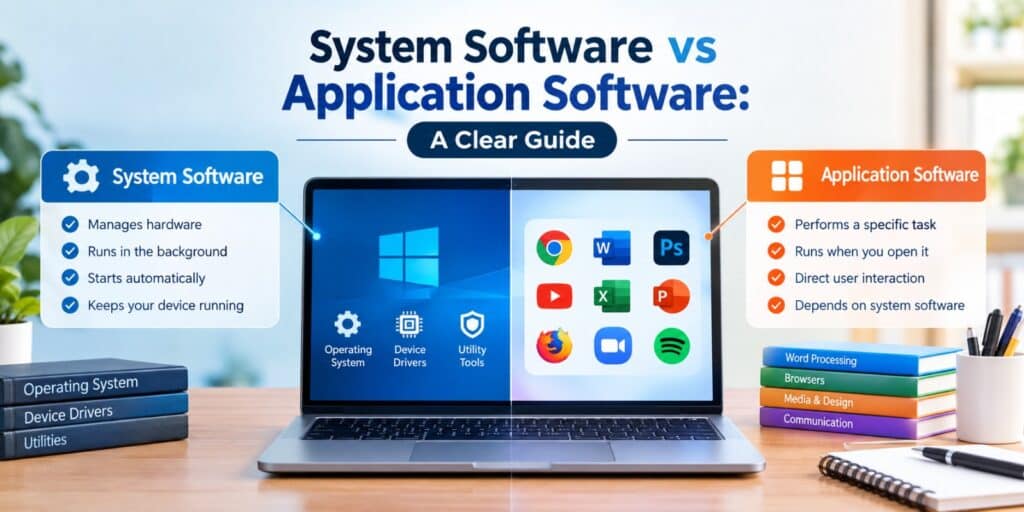
When you line up system software vs application software side by side, the split comes down to purpose. System software keeps the machine running. Application software helps you get something done.
If you want the full breakdown of how software as a category splits into these branches, our application vs software guide explains the broader terminology this comparison sits under.
| Aspect | System Software | Application Software |
| Purpose | Manages hardware and system resources | Performs a specific user task |
| Runs | Automatically at startup | Only when the user opens it |
| User interaction | Indirect, works in the background | Direct and user facing |
| Examples | Windows, macOS, device drivers | MS Word, Chrome, Photoshop |
| Dependency | Required for the device to work at all | Depends on system software to run |
Examples of System Software
These are the programs your device relies on before you open anything else. Most of them run without asking for your attention. You rarely see them, but you would notice immediately if they stopped working.
- Operating systems such as Windows 11 and macOS
- Device drivers for printers, graphics cards, and network adapters
- Utility software like disk cleanup tools and antivirus programs
- The BIOS or UEFI firmware that starts your device
Examples of Application Software
These are the programs you choose to open for a reason. Each one solves a specific problem or task. None of them can run without an operating system underneath.
- Word processors such as Microsoft Word and Google Docs
- Web browsers such as Chrome, Firefox, and Edge
- Media players and photo editors like VLC and Photoshop
- Communication apps such as Zoom and Outlook
System Software vs Application Software: How They Work Together
Think of system software as the ground floor of a building. Application software sits on top of it and depends on that foundation to stand. Neither one replaces the other.
When you open Chrome, the operating system allocates memory and connects the app to your screen and keyboard. Close Chrome and the operating system keeps running. Remove the operating system and Chrome has nowhere to go.
System Software vs Application Software: Quick Ways to Tell Them Apart
If you are staring at a process list and cannot decide which category something belongs to, these checks help. They work for almost any program you come across.
- Check if you opened it on purpose, that points to application software.
- Look for it running quietly in the background, that is usually system software.
- Ask whether the device can start without it, if not, it is system software.
- See if it needs an operating system to open, application software always does.
FAQs
What is the main difference between system software and application software?
System software manages the hardware and keeps the device running, while application software helps the user complete a specific task. System software loads automatically at startup. Application software only runs when you open it yourself.
Is Windows system software or application software?
Windows is system software. It manages the computer’s hardware, memory, and storage, and it creates the platform every application depends on to run.
Can application software run without system software?
No. Application software always needs an operating system to open and function. Without system software, the hardware has no way to interpret or run any application.
What are three examples of system software?
Common examples include operating systems like Windows 11 and macOS, device drivers for hardware such as printers, and utility programs like antivirus software.
Is a web browser system software or application software?
A web browser is application software. You open it yourself to complete a task, browsing the internet, and it depends on the operating system underneath to run at all.
Do I still need to keep system software updated in 2026 the same way as apps?
Yes. In 2026, keeping system software updated still matters as much as updating individual apps, since outdated operating systems and drivers are a common cause of security gaps and slowdowns.
Final Thoughts: Which One Actually Matters More?
People often ask me which one matters more for their laptop when it comes to system software vs application software. The honest answer is that you need both, but system software matters first.
In my repair work, most slow laptop complaints trace back to background system processes, not the apps themselves. Once you know which layer is acting up, troubleshooting gets far easier.
That is the same check I run every time a client hands me a sluggish laptop: look at the system layer before blaming the apps sitting on top of it. For a broader definitional overview, Wikipedia’s entry on software covers how this category fits into computing as a whole.