

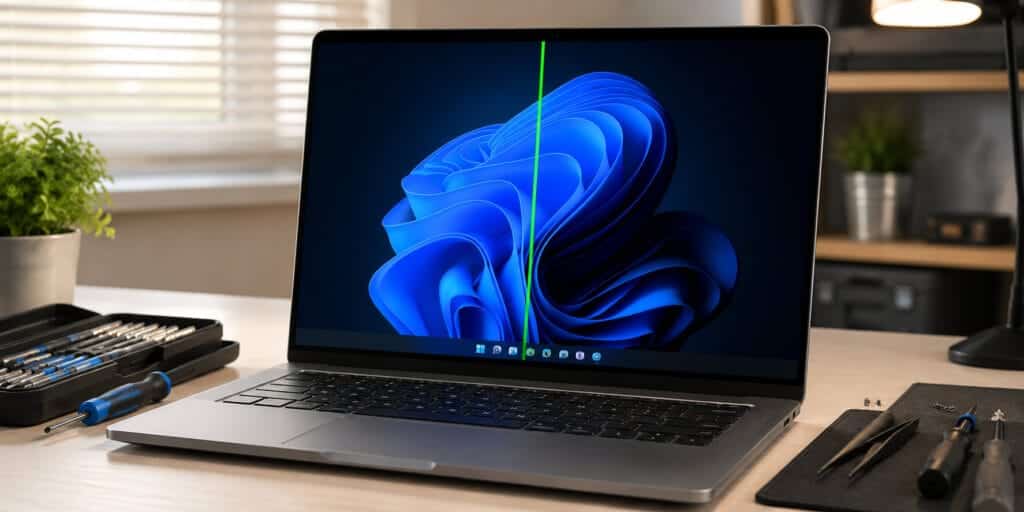
A white line on your laptop screen can feel scary. You did not drop your laptop. You did not spill anything. Yet there it is, cutting across your screen like a crack in glass. You are not alone. This is one of the most common laptop screen problems people search for help with.
The good news is that most causes are simple. Some you can fix yourself in minutes. So why is there a white line on your laptop screen? In most cases, it means your display cable is loose, your screen panel is damaged, or your graphics driver is outdated. Sometimes it is just a software glitch.
What Does a White Line on a Laptop Screen Actually Mean?
A white line on your laptop screen usually points to a problem between your screen and your motherboard. Think of it like a phone line. If one wire breaks, the call drops. Your screen works the same way. The line shows up because pixels in that row or column stop getting the right signal.
Instead of showing color, they show white, black, or a flickering mess. This problem is common across all laptop brands. Dell, HP, Lenovo, Asus, Acer, and Apple laptops can all develop this issue. Age does not matter much either. A two-year-old laptop and a brand-new one can both get a white line.
Why Is There a White Line on My Laptop Screen? Common Causes Explained
There are six main reasons a white line shows up. Each one has its own clues. Knowing which one fits your laptop helps you fix it faster.
Loose or Damaged Display Cable
Every laptop has a thin ribbon cable. It connects your motherboard to your screen. This cable bends every time you open or close the lid. Over time, that bending wears it down. A frayed or loose display cable is one of the top reasons for a white line on a laptop screen. You may notice the line gets worse when you tilt the screen.
This single fact explains why laptop screen problems often start gradually. The cable does not snap all at once. It wears thin over months of opening and closing the lid, until one day a thin white line appears and stays there even when you adjust the screen angle.
Damaged LCD or LED Panel
Sometimes the screen panel itself is broken. This can happen from a hard knock, pressure on the lid, or simply old age. LCD panels have a limited lifespan, often rated around 30,000 to 50,000 hours of use (Source: Digital Trends, 2024).
If your laptop screen has a white line that never moves, even when you connect an external monitor, the panel is likely damaged. This is different from a cable issue, because cable problems often disappear when you use an external screen.
Outdated or Corrupt Graphics Drivers
Your graphics card needs software to talk to your screen. If that software, called a driver, becomes outdated or corrupted, strange lines can appear. This is a software cause, not a hardware one.
The fix here is simple. Updating your graphics driver often makes the white line vanish without any repair cost. This is always worth trying first, since it costs nothing and takes only a few minutes.
Overheating Components
Laptops generate heat. Heavy gaming, video editing, or running too many tabs in Chrome can push internal temperatures past safe limits. When components like the GPU overheat, they can send faulty signals to the screen.
A laptop running above 90°C under load is considered a thermal risk by most manufacturers (Source: HP Support Documentation, 2025). This heat stress can cause lines, flickering, or sudden black screens.
Pressure Damage to the Screen
Did you carry your laptop in a backpack with heavy books on top of it? Pressure on a closed laptop lid is a sneaky cause of screen damage. The panel gets squeezed, and tiny internal fractures form. This often creates a line that was not there yesterday but appears overnight after travel. Many repair technicians report this as one of the most common causes they see in student laptops.
Software Glitch or Outdated Operating System
Not every white line means broken hardware. Sometimes it is just a glitch. A buggy app, a failed system update, or corrupted display settings can cause your screen to show a white line that disappears after a restart. If the line only appears in certain apps or games, but not in BIOS or boot screens, software is the likely cause.
Quick Diagnosis Table
| Symptom | Likely Cause | Hardware or Software |
| Line appears even before Windows loads | Cable or panel damage | Hardware |
| Line disappears on external monitor | Screen panel or cable | Hardware |
| Line moves when you tilt the screen | Loose ribbon cable | Hardware |
| Line only in one app or game | Driver or software bug | Software |
| Line appears after a system update | Corrupted driver | Software |
| Line shows on external monitor too | GPU or motherboard | Hardware |
How to Test If the White Line Is Hardware or Software
This is the most important step. It decides everything that comes next.
Connect your laptop to an external monitor or TV using an HDMI cable. If the white line shows up only on your laptop screen and not on the external monitor, your screen or cable is the problem. If the line appears on both screens, your graphics card or motherboard is likely at fault.
According to a 2025 repair industry survey by iFixit, screen and cable issues account for nearly 60% of all laptop display complaints brought into repair shops (Source: iFixit Repair Trends Report, 2025). This single test saves people from paying for the wrong repair.
Step-by-Step Fixes You Can Try at Home
Start with the easiest fixes before paying for a repair. Many laptop owners solve this without any tools.
- Restart your laptop fully, not just sleep mode, since a full restart clears temporary display glitches.
- Update your graphics driver through your laptop brand’s official support page.
- Check your screen resolution settings, since a mismatched resolution can mimic a line.
- Gently wiggle the screen at different angles while watching the line, since movement reveals a loose cable.
- Run your laptop in Safe Mode to rule out third-party software causing the glitch.
- Let your laptop cool down for 20 minutes, then turn it back on to rule out overheating.
If none of these work, the issue is almost certainly hardware. At that point, a technician needs to open the laptop.
When You Need a Professional Repair
Some fixes need real tools and real experience. Opening a laptop without training can crack the screen further or void your warranty.
You should see a repair technician if the white line appeared after a drop, if the line gets wider over time, or if you see multiple colored lines instead of just one white line. A trained technician can test the ribbon cable, inspect the panel, and replace only what is broken instead of the whole screen.
Replacing a laptop screen typically costs between $80 and $300 depending on the laptop model and screen size (Source: RepairClinic Cost Guide, 2024). A simple cable reseat, by comparison, often costs far less and takes under an hour.
Can a White Line on a Laptop Screen Get Worse Over Time?
Yes, it usually does. A white line caused by a damaged cable or cracked panel rarely heals itself. It tends to spread, multiply, or turn into a colored block over weeks.
Does Closing a Laptop Lid Too Hard Cause a White Line?
Yes, it can. Closing the lid with force, or with an object trapped inside, pressures the screen and ribbon cable. This pressure can crack pixels and create a permanent white line.
How to Prevent a White Line on My Laptop Screen
Prevention is cheaper than repair. A few simple habits protect your screen for years.
Avoid putting heavy items on top of a closed laptop. Clean your laptop vents every few months to prevent overheating. Open and close the lid gently instead of yanking it. Keep your graphics drivers updated at all times. Use a padded sleeve when carrying your laptop in a bag.
These habits matter because most screen damage builds up slowly. A laptop that gets gentle treatment for years rarely develops a sudden white line, while one that gets tossed into bags and slammed shut often does.
Why is there a white line on my laptop screen all of a sudden?
A sudden white line usually means a cable shifted, the screen took pressure, or a driver update went wrong. Check if it appears on an external monitor too.
Can I fix a white line on my laptop screen myself?
Yes, if it is caused by software or a loose cable you can reach safely. Update drivers first. If the screen itself is cracked, leave the repair to a professional.
Does a white line mean my laptop screen is dying?
Not always. Some lines come from software glitches that go away after a restart. Persistent lines on boot screens usually mean hardware damage.
Is a white line on a laptop screen covered by warranty?
Often yes, if the laptop is still under manufacturer warranty and the damage was not caused by drops or pressure. Contact your laptop brand’s support team to check.
Why does the white line disappear when I connect an external monitor?
This means the problem is with your laptop screen or its cable, not your graphics card. The graphics card is sending a correct signal to the external screen.
How much does it cost to fix a white line on a laptop screen?
Costs range from free, for a driver update, to $80 to $300 for a full screen replacement, depending on your laptop model.
Can overheating really cause a white line on a laptop screen?
Yes. Overheating stresses internal components and can send incorrect signals to the display, creating lines or flickering.
Will updating Windows fix a white line on my laptop screen?
Sometimes. If the cause is a corrupted driver or software bug, a Windows update or driver reinstall often resolves it.
Does a white line spread across the whole laptop screen?
It can. Cable and panel damage often gets worse over time, turning a single line into multiple lines or colored blocks.
Is it safe to keep using a laptop with a white line on the screen?
Yes, in most cases, especially if it is small and not spreading. But have it checked soon, since hardware damage rarely improves on its own.
A white line on your laptop screen is annoying, but it is rarely the end of the world. Most cases trace back to a loose cable, an aging panel, or a simple driver glitch. Test with an external monitor first, try the easy software fixes, and call a professional only if the hardware itself needs attention. Your laptop has more life left in it than that one stubborn line suggests. For deeper technical background on how display panels work, you can read more on LCD technology.
Read More: https://techworldgarage.com/black-spots-laptop-screen/
Pingback: Black Lines on Laptop Screen: Causes and How to Fix Them
Pingback: Windows Game Mode Not Working? Here Is the Real Fix - Tech World Garage
Pingback: Lines On Your Monitor Screen? Here Is The Real Fix - Tech World Garage